


A convincing MT760 screen can still prove nothing about a bank undertaking. An mt760 simulation tool can help illustrate or test message-related content, but a visual output is not an authenticated SWIFT message, proof of funds, or confirmation that a bank has issued an instrument.
The distinction matters because searches for “MT760” can also lead to an unrelated computer mouse, while financial claims may be presented through screenshots, PDFs, or other test artifacts. Technical-looking materials do not show that a real bank-to-bank communication has taken place. A claim about a genuine MT760 must be verified through appropriate banking channels, not judged by appearance.
This article explains what a simulation can represent, what it cannot establish, and how it differs from a bank-issued message. It also sets out practical verification steps, including the role of the beneficiary’s bank. Treat simulations as test artifacts, and rely on authenticated financial channels to assess real claims.
Key Takeaways
- “MT760” can refer to a financial message or a Rapoo mouse model, so context matters when assessing search results.
- An mt760 simulation tool can support a test or training context, but its output does not establish that a bank issued a financial undertaking.
- MT799, MT760, proof of funds, and settled transactions are distinct concepts. Identifying a message type alone does not prove funds exist.
- To assess a claim, contact the institution said to have issued the message using independently obtained contact details, and work through the beneficiary’s bank.
- For software information, visit sqr400flashfund.com, message Telegram, or email support@sqr400flashfund.com.
What Does MT760 Mean, and Why Do Search Results Show a Mouse?
In financial messaging, MT760 is a SWIFT message type associated with issuing a demand guarantee or standby letter of credit (SBLC). In plain English, it is a structured bank-to-bank communication used to convey details of a bank’s undertaking. It is not a general label for money, a balance, or a completed payment. The message format describes communication; it does not, by itself, show that funds have been transferred or collateral provided.
SWIFT is the network and messaging framework financial institutions use to exchange standardized messages. The SWIFT (Society for Worldwide Interbank Financial Telecommunication) overview provides background on the organization and its interbank messaging role. Read references to MT760 in context: a bank-originated communication within that framework is different from a document or screen image created by software.
MT760 in financial messaging
An MT760 relates to a particular message format, not a standalone pool of funds. Its content concerns a guarantee or standby letter of credit, but a description, mock-up, or software-generated display cannot establish that a bank has issued one. When evaluating a transaction claim, distinguish between a rendered message and evidence that an undertaking exists, funds are available, or a transaction has settled.
A simulation represents information in a test or training context. It may help someone view or discuss message-like fields, but it does not become a financial communication because it resembles one. An authenticated financial communication is transmitted through the relevant bank channels; a simulation remains a software-generated representation outside that process. The two may look similar on screen, but they have different origins and evidentiary value.
That is the central limit of an mt760 simulation tool: it can display a representation, but it cannot independently confirm a bank’s action. Keep message-format questions separate from claims about issuance, funds, collateral, or settlement. Each claim requires verification through the appropriate financial institution, not visual inspection of a simulated artifact.
Why MT760 can also refer to a mouse
MT760 is also used in the name of a Rapoo consumer-electronics product, a computer mouse. Product listings and comparison pages may therefore appear alongside financial content in search results. Those pages use “MT760” as a model name, not as a reference to SWIFT messaging or a bank undertaking. The shared characters create an acronym collision, not a connection between the product and finance.
Use the surrounding terms to identify the meaning. Results mentioning SWIFT, guarantees, standby letters of credit, or banks concern financial messaging. Results mentioning Rapoo, mouse variants, ergonomics, or computer peripherals concern electronics. A mouse listing is irrelevant when assessing a financial claim; for computer accessories, MT760 is simply a product identifier.
For information about SQR400 software, visit SQR400 financial simulation software. Contact is available via Telegram or support@sqr400flashfund.com.
How an MT760 Simulation Differs from a Bank-Issued Message
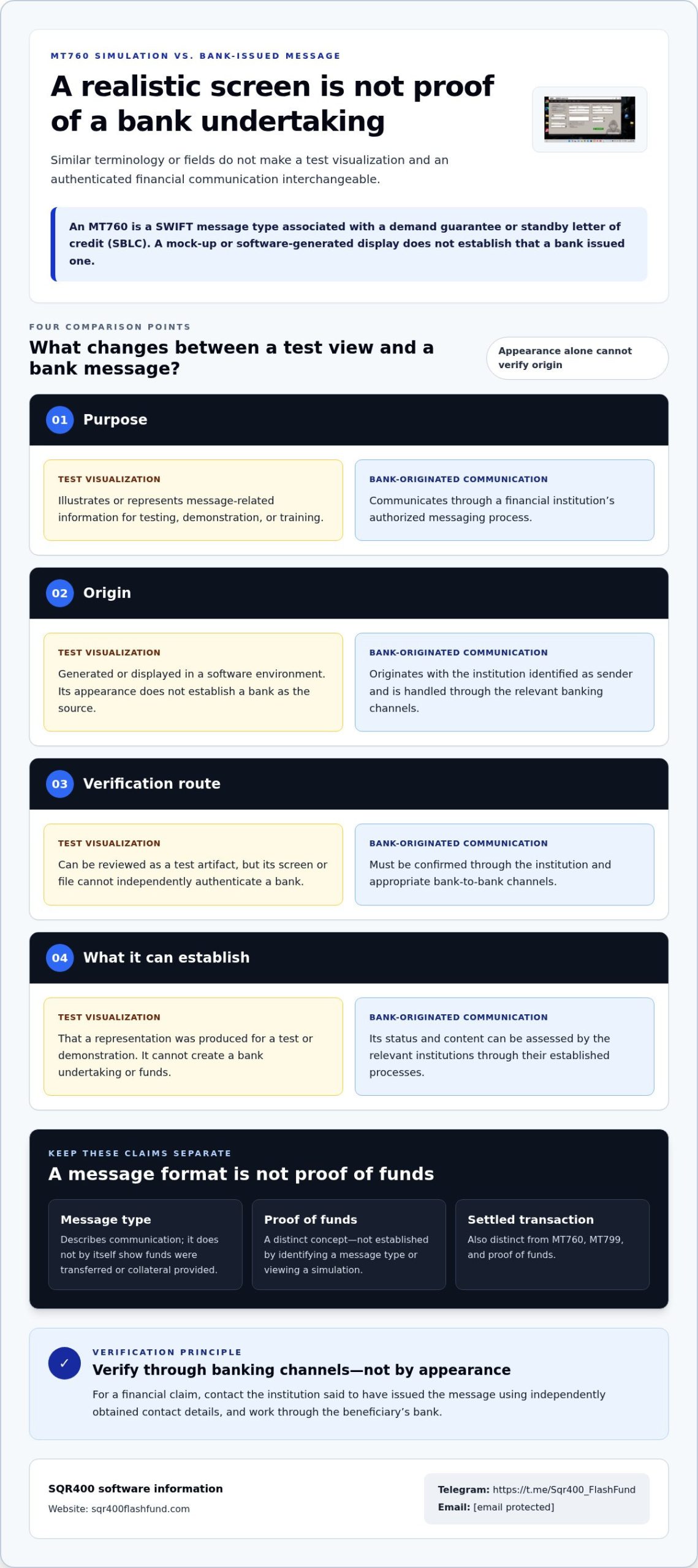
A simulation and a bank-issued communication may use similar terminology or display comparable fields, but they are not interchangeable. Their purpose, origin, and verification route differ. Visual resemblance is not proof of authenticity and should not be used to draw conclusions about an undertaking or funds.
Comparison point
Test visualization
Bank-originated communication
Purpose
Illustrates or represents message-related information for testing, demonstration, or training.
Communicates through a financial institution’s authorized messaging process.
Origin
Generated or displayed in a software environment. Its appearance does not establish a bank as the source.
Originates with the institution identified as sender and is handled through the relevant banking channels.
Verification route
Can be reviewed as a test artifact, but its screen or file cannot independently authenticate a bank.
Must be confirmed through the institution and appropriate bank-to-bank channels.
What it can establish
That a representation was produced for a test or demonstration. It cannot create a bank undertaking or funds.
Its status and content can be assessed by the relevant institutions through their established processes.
What a test simulation can represent
A test visualization can help explain how message-related information might be organized or discussed in a controlled context. For example, a training display might show illustrative fields so participants can understand the general structure of a message. That is a representation, not a transmission or issuance event. Clearly labeling a test artifact helps explain its purpose without suggesting that it proves a live transaction.
An mt760 simulation tool should be understood by what it represents, not by how realistic its interface appears. It does not create an undertaking, place funds at a beneficiary’s disposal, or demonstrate that collateral exists. Those are separate financial claims and cannot be inferred from a software display.
What a simulation cannot establish
A screenshot, PDF, or software screen cannot authenticate the institution named on it. Visual details, technical language, or a message-like layout do not prove origin, transmission, acceptance, available liquidity, or settlement. Even a convincing rendering is insufficient evidence of a bank’s action.
Only the appropriate financial institution can verify its own communication through the relevant banking channels. If a claim depends on an MT760, seek confirmation from the institution said to have issued it, using independently obtained contact details and the beneficiary’s bank as the verification route. A test display is not a substitute for that confirmation.
Readers assessing software representations can find more information about financial simulation software, while keeping test visualization separate from bank verification.
MT760, MT799, and Proof of Funds: Avoiding Common Misinterpretations
Message codes describe types of financial communication; they do not automatically prove that money is available or a transaction has settled. MT760 is associated with a bank guarantee or standby letter of credit. MT799 is a free-format SWIFT message that can carry text between institutions, but it does not itself create a financial undertaking. Proof of funds is a separate claim about financial capacity, assessed through evidence and verification rather than a message label alone.
These distinctions matter because a message reference, a screen image, and an institution-verified communication are not interchangeable. A document bearing an MT760 or MT799 label does not establish that the named bank sent it. A message type alone also does not confirm a balance, accessible liquidity, or completed transfer.
How to discuss MT760 and MT799 accurately
Describe each message by its purpose, not by assumptions about what it proves. MT760 is associated with guarantee or standby-letter-of-credit messaging. MT799 is a free-format message, so its content depends on the text sent; it is not a substitute for an MT760 undertaking. Related message types serve different functions and should not be treated as equivalent simply because they appear in the same transaction discussion.
MT103 is another distinct message type, generally associated with a customer credit transfer. Its presence or mention is not, by itself, proof that a transfer has completed or that a recipient can access funds. For each code, consult current SWIFT documentation or ask the relevant bank what the specific message means in context. This is particularly important when a claim depends on a message’s status, sender, or effect.
A simulation or software-generated representation does not change these definitions. An mt760 simulation tool may present message-related content for illustration, but that output cannot establish whether an MT760, MT799, or MT103 was transmitted by a financial institution. The format name identifies a message category; it does not authenticate a particular instance.
Why proof of funds requires independent verification
Proof of funds is not one universal message code. It refers to evidence used to assess whether funds or financial capacity exist for a stated purpose. What qualifies depends on the recipient’s requirements and the institution involved. A screenshot or simulated display may show information, but it cannot independently authenticate its source, confirm that funds remain available, or show that a transaction has settled.
Counterparties should rely on verification processes accepted for their transaction and confirm relevant claims directly with the institution through independently obtained contact details. If a claim concerns a specific SWIFT message, the relevant bank can clarify its origin and status through appropriate channels. Keep the questions separate: Was a message sent? What does that message type communicate? Is there independently verified evidence of funds or settlement?
Clear terminology reduces mistaken inferences. A message reference is not proof of funds, and a visual representation is not bank confirmation. Assess each claim against the evidence and verification route that applies to it.
How to Verify an MT760-Related Financial Claim
Start verification with the institution said to have issued the communication, not with the appearance of a document or the confidence of the person presenting it. Identify exactly what is being claimed: that a message was sent, that a bank undertaking was issued, or that funds are available. These are separate claims and may require different confirmation.
Verify a financial claim at its source, not by appearance. Use contact details obtained independently from the institution, such as details from its official website or existing trusted records. Do not rely only on a phone number, email address, or link printed on the document being assessed.
A cautious verification sequence
- Identify the named institution. Record which bank is said to have sent the communication and what specific fact needs confirmation. Separate a claim about message transmission from a claim about an undertaking or funds.
- Find an independent contact route. Use established contact details sourced separately from the presented material. If the matter involves a beneficiary, coordinate through the beneficiary’s bank and its established banking channels.
- Request direct confirmation. Ask the institution to confirm whether the communication originated from it and clarify its status. Provide only the information it needs to locate the matter, and follow its normal process for handling the inquiry.
- Wait for an authoritative response. Do not treat silence, a forwarded reply, or another screenshot as confirmation. If the institution cannot verify the material claim through its channels, treat the claim as unresolved.
Handling screenshots, demos, and test files
Keep test materials unmistakably separate from live financial records. Label demonstrations and training files as simulated or test-only in the materials themselves, and avoid presenting them in a way that could be mistaken for an issued bank communication. A display produced by an mt760 simulation tool may help explain message-related concepts, but it cannot replace independent verification.
Protect account access. Do not include real banking credentials, login details, authentication codes, or sensitive account information in demonstrations. Share only the minimum information needed for a legitimate verification inquiry, using the institution’s established channel rather than sending sensitive details in response to an unsolicited request.
If a transaction depends on a material MT760-related claim and the relevant institution cannot independently verify it, pause the transaction until the claim is resolved. A document’s format, visual detail, or technical terminology should not override an unresolved verification gap. Keep a clear record of the institution contacted, the route used, and the confirmation received, while handling sensitive information according to the institution’s instructions.
For readers evaluating software in a clearly separated test context, explore financial simulation software without treating simulated output as verification of a real financial claim.
Choosing a Legitimate Simulation Context and Next Steps
A simulation belongs in a clearly defined test or training context, separate from live financial communications. State its purpose before anyone uses or views the output. A display that resembles a financial message must not be presented as proof of an issued guarantee, available balance, completed transfer, or actual financial capacity.
That boundary applies to every mt760 simulation tool. A simulated representation can support discussion or demonstration, but it does not create, prove, transfer, or make funds available for withdrawal. Keep the environment’s purpose explicit, and identify any output clearly as simulated.
Questions to establish a suitable test environment
Before a test begins, define its objective and identify who is authorized to access the environment. These controls help participants understand what the simulation is meant to illustrate and reduce the risk of test material being confused with operational communication.
- What is the test objective? Specify whether the activity is for training, demonstration, or another defined test purpose.
- Who can access it? Identify authorized participants and limit access to those who need it for that objective.
- What data will be used? Use test data and clearly marked outputs rather than real customer financial records or sensitive account details.
- Where will the output appear? Keep demonstrations separate from negotiations, transaction decisions, and claims about actual financial capacity.
These questions establish the scope of the exercise. They do not validate a financial claim. If a participant introduces a real transaction or asks the demonstration to serve as evidence of funds, stop treating the interaction as a test and move to institutional verification.
What to do when a claim remains uncertain
If a guarantee, balance, or transfer claim remains unresolved, do not use a software display to fill the verification gap. Defer decisions that depend on that claim until the relevant institution has confirmed it through established communication channels. A counterparty’s explanation or a convincing visual does not replace confirmation from the institution involved.
Keep the questions precise: what communication is being claimed, which institution is said to have sent it, and what status needs confirmation? Contact the institution using independently obtained details, and follow its process for handling the inquiry. If confirmation cannot be obtained, treat the claim as unverified rather than interpreting a simulation as evidence.
For broader terminology, consult the related MT103 guide alongside official message references, taking care not to treat distinct message types as equivalent. To learn more about financial simulation software, visit the official website. For support, use Telegram or email support@sqr400flashfund.com. Keep the distinction firm: testing can illustrate, while only appropriate institutional channels can address a real financial claim.
Make Verification the Next Step
Set a clear decision standard before relying on any MT760-related material. Record the claim that matters, identify the source capable of confirming it, and keep technical descriptions grounded in verified references. This helps prevent an mt760 simulation tool or other visual artifact from being mistaken for financial evidence.
For related terminology, review the MT103 protocol guide. Use it to build context, not as a substitute for confirmation about a particular message. If a decision depends on an undertaking, balance, or transfer, seek direct confirmation from the relevant financial institution through its established channels.
Keep the distinction operational: simulations support testing or explanation, while real financial claims require institutional confirmation. For more information about the software, visit the official SQR400 website. Contact SQR400 Flash Fund via Telegram or email support@sqr400flashfund.com. Proceed with a defined test purpose, reliable references, and a verification path that matches the claim.
Frequently Asked Questions
What is an MT760 simulation tool?
An mt760 simulation tool produces a software representation for testing or demonstration; it does not transmit a bank message or establish a financial undertaking. For example, a training display may help explain message-related terminology, but it cannot show that a bank issued a guarantee, that funds exist, or that a transfer settled. Check the specific MT760 description against current SWIFT or bank documentation, since precise interpretation depends on authoritative references.
Can an MT760 simulation create a real bank guarantee?
No. A software simulation cannot itself create a bank-issued guarantee or standby letter of credit. If a business decision depends on an alleged undertaking, identify the institution said to have issued it and request confirmation through that institution’s established channels. Find contact information independently, rather than relying only on details in a screenshot or file. Treat an unverified display as an illustration, not evidence of an issued commitment.
How can I verify whether an MT760 message is genuine?
Contact the institution named as the issuer using contact details you obtained independently, then ask it to confirm the communication and its status. If you are the intended beneficiary, involve your bank through its normal communication process. The key question is whether the institution can verify the specific claim through its established channels. Do not use visual cues, file formatting, or a presenter’s explanation as authentication.
What is the difference between MT760 and MT799?
MT760 and MT799 are distinct message designations, not interchangeable labels. MT760 is associated with guarantee or standby-letter-of-credit messaging, while MT799 is a free-format message. The code alone does not explain the status or effect of a particular communication. For an unfamiliar reference, consult current authoritative documentation and ask the relevant institution to clarify the message in context instead of relying on an informal summary or software display.
Does a screenshot of an MT760 prove that funds are available?
No. A screenshot cannot establish who created or sent the item, whether a bank has issued an undertaking, whether funds are accessible, or whether a transaction has settled. For example, an image showing a balance is not equivalent to confirmation from the institution that maintains the account. Before making a decision that depends on financial capacity, use the verification process accepted by the relevant institution or transaction counterparty.
Can simulated financial messages be used for training or software testing?
They can be used as test or demonstration materials when the context is authorized, the outputs are clearly labeled as simulated, and they are kept separate from genuine financial records. Use synthetic test data, not real customer records, credentials, or authentication codes. Set expectations before sharing a demonstration so recipients understand it is not an issued bank message, proof of funds, or evidence that a transaction occurred.