


An MT760 can support the issuance of a bank guarantee or standby letter of credit, but a simulated display is not an authenticated interbank message. A Swift MT760 simulation tool can illustrate message structure; it cannot, by appearance alone, establish that a bank issued an undertaking or that funds are available. That distinction is central to understanding what an MT760 does.
The technical format can look convincing, so it’s reasonable to ask how the message moves between banks and what its fields mean. This article explains MT760’s role in SWIFT communication, how it differs from related message types, and why receipt, authentication, and an enforceable obligation are separate questions.
You’ll also learn which operational risks and costs may matter when arranging a guarantee, and where simulation software fits: it can illustrate transaction-message concepts, but it cannot replace bank-to-bank confirmation.
Key Takeaways
- Understand how MT760 supports the issuance of a bank guarantee or standby letter of credit, and why message format alone doesn’t prove an undertaking is valid.
- Learn which message fields and validation checks matter when assessing a simulator’s usefulness for structured-message testing.
- Separate offline message visualization from tests that exercise a SWIFT-compatible environment and its controlled workflows.
- Recognize key risks, including false confidence from screenshots and confusion between message receipt, authentication, and a binding obligation.
- Compare the purpose of simulation software with the distinct role of bank-to-bank communication in confirming an instrument.
Interbank SWIFT communication
MT760 operates within SWIFT’s bank-to-bank messaging network, not as a standalone payment instruction. Its structured format communicates an undertaking, with the sending and receiving institutions central to how the message is handled.
In trade finance, an issuing bank sends an MT760 to a beneficiary’s bank to issue a bank guarantee or standby letter of credit. The undertaking supports a defined commercial arrangement, such as a supplier contract or an international trade obligation. It does not function like a routine credit transfer. The parties, amount, expiry, claim conditions, and governing rules shape the instrument’s meaning.
SWIFT includes more than 220 message types, each serving a defined communication purpose. Category 7 covers documentary credits, demand guarantees, and standby letters of credit. MT760 is a structured message format for issuing a bank guarantee or standby-type undertaking. A documentary credit and a standby can share a broad trade-finance context, but their contractual purpose and conditions determine how each instrument works.
A SWIFT message has three parts: a header, text, and trailer. The header carries routing information, while the text contains the structured transaction content. The trailer closes the message and supports message handling. A 760 message can be accompanied by up to seven MT761 messages when guarantee wording exceeds one message’s capacity. That extension carries additional text; it does not replace the need to interpret the underlying undertaking.
Bank identifiers also affect routing. A standard BIC contains either 8 or 11 characters. Its first 4 identify the institution, the next two identify the country, and the following two identify the city or location. When present, the final three characters identify a specific branch. Without those characters, the BIC directs the message to the institution’s primary office.
Simulator and Testing Environment Comparisons
An MT760 simulator displays or models message content, while a SWIFT-compatible testing environment supports controlled testing of message workflows. That difference matters because a visual representation can help teams inspect format and field relationships, but it doesn’t demonstrate live interbank routing. Separate those functions when evaluating a tool: identify whether it presents sample content, exercises a test workflow, or connects to actual bank infrastructure.
Testing Without a SWIFT Connection
Offline testing means creating a clearly labeled sample message and reviewing its fields locally, without sending it through SWIFT. Use fictional institutions and transaction data, then compare the sample’s structure with the intended test scenario. This lets teams discuss message sequencing and beneficiary details without implying issuance, confirmation, or access to bank systems.
MT799 illustrates why message purpose matters. It is a free-format bank-to-bank message for communicating information about guarantees and letters of credit, not a funds transfer or promise to transfer funds. It may serve as notification before an MT760, but it does not itself issue a guarantee or standby. In each case, distinguish the message’s stated purpose from the legal and commercial effect of the instrument.
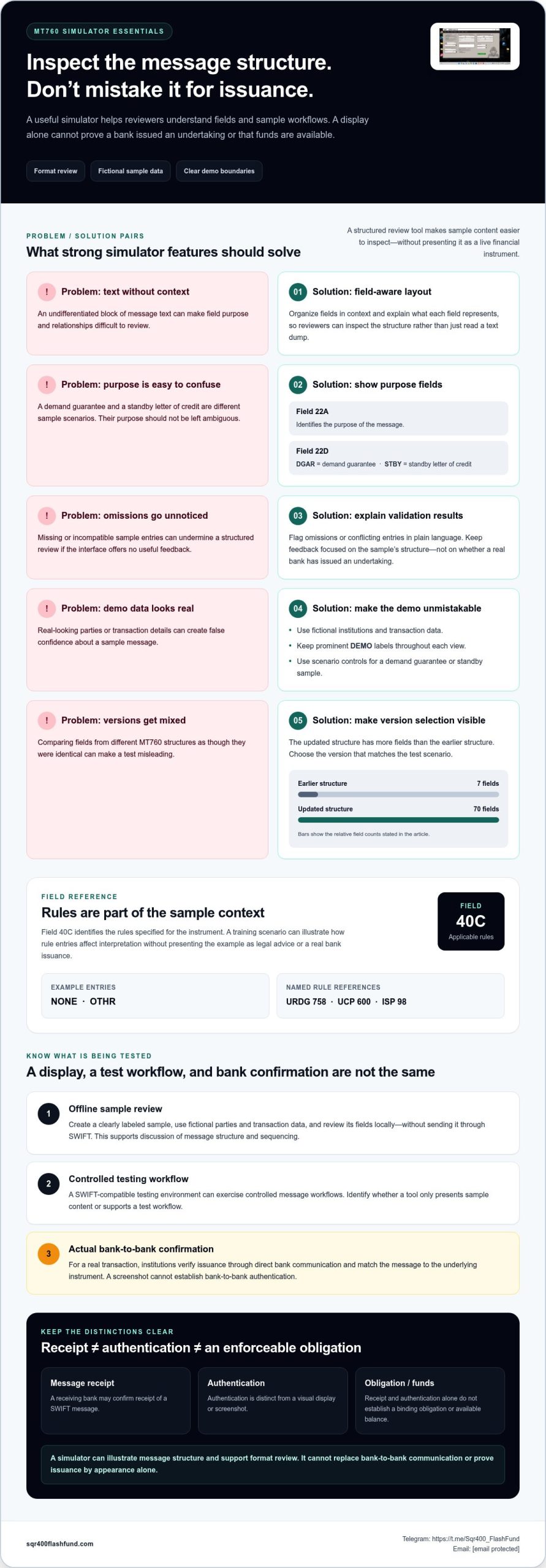
Authentication also involves distinct stages. A receiving bank may confirm receipt and authentication of a SWIFT message, but that confirmation alone does not establish an available balance or binding obligation. A screenshot cannot establish bank-to-bank authentication. For a real transaction, institutions verify issuance through direct bank communication and match the message to the underlying instrument. Simulation supports format review; it cannot replace interbank processes.
What features should an MT760 simulator include?
A useful MT760 simulator should make message concepts inspectable without presenting a demonstration as an issued bank undertaking. Its strongest features support structured review, clearly marked sample data, and controlled testing. For example, a reviewer should be able to distinguish a sample standby letter of credit from a demand guarantee without mistaking either for live financial confirmation.
Field-aware validation is central. The updated MT760 structure has 70 fields, compared with 7 in the earlier structure. A simulator should organize fields in context and flag omissions or incompatible entries, rather than treating the message as undifferentiated text. Field 22A identifies the purpose of the message, while Field 22D distinguishes “DGAR” for a demand guarantee from “STBY” for a standby letter of credit.
Applicable-rule handling also matters. Field 40C identifies the rules specified for the instrument. A training environment can show how entries such as “NONE” or “OTHR” affect a sample’s interpretation, while keeping those examples separate from legal advice or a real bank issuance. Named rule references can include URDG 758, UCP 600, or ISP 98 where relevant to the scenario.
- Scenario controls: Select a demonstration type, such as a demand guarantee or standby, without using a real transaction.
- Field guidance: Explain the purpose of fields such as 22A, 22D, and 40C inside the interface.
- Sample-data safeguards: Use fictional parties and amounts, with prominent “DEMO” labels throughout each view.
- Validation feedback: Identify missing or conflicting sample entries and explain the issue in plain language.
Version awareness prevents a common testing flaw: comparing fields from different message structures as if they were identical. The difference between the earlier 7-field structure and the updated 70-field structure makes version selection important. A simulator should identify which structure a demonstration uses, then keep its field labels and validation logic consistent with that selection.
Clear scenario boundaries matter, too. In an “ISSU” example, the interface can explain that the code represents issuance in the sample context. In an “ISCO” example, it can distinguish counter-guarantee concepts. These labels help learners understand a message’s purpose without suggesting that a generated screen proves an actual undertaking exists.
Privacy controls should minimize exposure during demonstrations. Use fictional beneficiary names, institution identifiers, references, and transaction details. Make the sample status visible in exported or printed views, too, so a detached screenshot cannot be mistaken for authenticated bank communication. Avoid importing real customer records into a general-purpose demonstration file.
Finally, useful review tools include readable field explanations, scenario notes, and an audit trail of edits made within the exercise. A reviewer should be able to see what changed between sample versions and why. Together, these features make an MT760 simulator and tools provided by SQR400 Flash Fund a controlled learning and format-review aid, not evidence of funds, bank transmission, or a binding credit undertaking.
Privacy protections should carefully safeguard beneficiary names, financial intermediaries, and applicant details, and should avoid retaining entered material longer than a demonstration requires. It can also provide a reset control and a clear indication that saved or exported views remain illustrative. Reviewers should be able to inspect how a selected rules value affects the sample while seeing that no live undertaking has been created.
The applicable-rules value should reflect the instrument’s governing terms. If an MT 760 instrument is subject to an earlier version of a rule, the value “OTHR” should be selected and the rule details may be provided in a separate narrative field. A simulator can make these choices explicit, preserve the narrative alongside the sample, and flag an inconsistent combination for review. This helps users distinguish a missing selection from an intentional choice, while keeping the exercise limited to message structure and sample interpretation.
How can I simulate an MT760 message for testing without connecting to SWIFT?
Build a local demonstration with synthetic data, not a transmissible bank message. First define the test objective, such as training staff to recognize guarantee-related information or reviewing a screen layout. Mark the output clearly as “DEMO” and avoid reproducing a document that could be presented as bank-issued evidence.
Use a mock data model rather than a realistic SWIFT payload. Create fields for generic roles such as “issuing institution,” “beneficiary,” “reference,” and “expiry.” Populate them with obviously fictional values, such as “Example Bank A” and “DEMO-REF-001.” Do not use real bank names, BICs, customer details, transaction references, or actual guarantee wording.
Set up the exercise in a local application, spreadsheet, or training interface with no transmission function. Keep the sample file separate from production records. A test record might describe a fictional standby scenario, with every value labeled illustrative. The goal is to assess whether a user understands the fields, not to create a message that resembles authenticated communication.
- Define the learning goal. Choose one task, such as identifying the beneficiary role in a sample record.
- Create fictional inputs. Use invented organization names and reference strings that cannot be mistaken for live data.
- Review the screen. Confirm that labels, explanations, and sample status remain visible throughout the exercise.
- Record the result. Note confusion or interface defects without saving real financial information.
Test the interface with contrasting cases. One sample can show a standby scenario; another can represent a demand-guarantee scenario. Use the labels “STBY example” and “DGAR example” only as educational tags, not as generated financial instructions. A reviewer can then assess whether the interface makes the distinction clear.
Include an intentionally incomplete mock record to test error handling. For instance, omit the fictional beneficiary name and see whether the interface highlights the empty field. The test should explain what is missing from the example, rather than inventing a valid value or generating a complete-looking bank message.
Keep sample outputs controlled. Add a visible watermark to every screen capture, print view, and exported file. Name files with terms such as “training-sample” and store them separately from transaction documents. If a screenshot is detached from its original context, its label should still identify it as simulated material.
Keep interface testing separate from message verification. A local exercise can assess navigation, field descriptions, and staff comprehension. It cannot demonstrate that a bank sent, authenticated, or accepted an undertaking. Never present a mock screen as confirmation of funds, credit, issuance, or beneficiary rights.
End each exercise with a review record: state the scenario, list the fictional fields used, and note any interface issues. For example, record whether a reviewer could distinguish the standby example from the demand-guarantee example. This creates a repeatable training record while keeping real institutions, identifiers, and financial claims outside the simulation.
How do MT760 simulators compare with SWIFT-compatible testing environments?
An MT760 simulator models message content for demonstrations, while a SWIFT-compatible testing environment exercises message workflows within a controlled setup. The distinction determines what a test can show. A simulator can help reviewers inspect a sample screen; a testing environment can assess how a system handles defined message events. Neither visual output alone establishes that a bank issued an undertaking.
Start with the test objective. If a training team needs to explain how message fields relate, a simulator may be enough. For example, a trainer can display a fictional demand-guarantee scenario and discuss its beneficiary and expiry details. If an operations team needs to test how an application processes incoming or outgoing messages, the focus shifts to workflow behavior, not just the screen.
A simulator generally focuses on presentation and learning. Depending on its design, users might review sample fields, switch between illustrative scenarios, or discuss how an interface displays message data. These features do not imply SWIFT connectivity, access to bank infrastructure, or message authentication. Treat “simulation” as a description of the demonstration, not proof of transmission.
A SWIFT-compatible testing environment is intended for controlled technical testing of message-related processes. The test may examine how a system receives, routes, validates, or records test messages. The precise behavior depends on the environment and its configuration. A successful workflow result shows how that test system responded; it does not confirm a live MT760 or create a beneficiary’s rights.
- Format review: Use a simulator to teach field relationships with fictional examples.
- Interface review: Use sample screens to assess labels, navigation, and staff comprehension.
- Workflow testing: Use a controlled environment to examine application handling of test events.
- Bank confirmation: Use direct interbank communication for verification of an actual undertaking.
Make the test boundary explicit. For example, a local display marked “DEMO” can support a classroom exercise, while a separate controlled workflow can test system behavior. Use fictional institution names and references in demonstration materials. Never put live customer data into a general training screen or circulate sample output as bank evidence.
Interpret results carefully. A simulator review can reveal confusing labels or a missing explanation. A workflow test can show that an application failed to process a test event. Neither result proves that a receiving bank authenticated an actual message. Confirmation that a bank received and authenticated a message is distinct from confirmation of a binding obligation or available funds.
Choose according to the decision the test must support. For a staff briefing on the difference between a demand guarantee and a standby letter of credit, a labeled mock scenario may be enough. For application integration, a controlled testing environment is the relevant category. For a live transaction, neither replaces communication between the institutions handling the instrument.
Separate these functions in test documentation: record whether the exercise covered display, workflow, or bank confirmation. That single distinction prevents a screenshot from being mistaken for evidence of issuance. To explore software information for demonstrations, review SQR400 software details.
SQR400 Flash Fund: SQR400 v5.8 Pro
SQR400 Flash Fund offers SQR400 v5.8 Pro for professionals exploring digital transaction simulations and financial visualizations. Its supported protocols include SWIFT MT760, MT103, and MT799. Use it for demonstration purposes, while keeping simulated message displays distinct from authenticated bank communications and actual undertakings.
Consider SQR400 v5.8 Pro when your work calls for software focused on transaction visualization rather than interbank message transmission. It does not provide actual money transfer services, and a simulation cannot establish that a bank issued or authenticated an MT760.
Visit SQR400 Flash Fund’s official website, or contact the team through Telegram or email to learn more.
Turn Message Knowledge Into a Controlled Demonstration
Set your objective before choosing a demonstration workflow. A useful exercise should help your team interpret sample data, distinguish simulated displays from bank communications, or evaluate a software interface. Define the objective first, then keep test materials fictional and clearly labeled. This keeps the focus on learning, not on creating output that could be mistaken for an issued undertaking.
A swift MT760 simulation tool can support message-focused demonstrations, but it cannot replace interbank confirmation. For software exploration, SQR400 Flash Fund offers SQR400 v5.8 Pro, SQR400 v5.8 Lite, and SQR400 v7.8.4. Select the option that aligns with your demonstration needs and maintain a clear boundary between visualization and live banking processes.
Define what you want your demonstration to accomplish, then explore the available software information. For direct contact about your evaluation, reach SQR400 Flash Fund through Telegram or email. With a defined objective and disciplined handling of sample data, you can move forward with clarity and confidence.
Frequently Asked Questions
What Exactly is an MT760?
An MT760 is a structured SWIFT message used to issue a bank guarantee or standby-type undertaking. Its function depends on the instrument’s terms, not simply the message’s appearance. For instance, Field 22D distinguishes a demand guarantee, marked “DGAR,” from a standby letter of credit, marked “STBY.” A sample display can illustrate that distinction, but it cannot establish that a bank has issued either instrument.
What is a SWIFT MT 760 message used for?
A guarantor or standby issuing bank sends an MT760 to the beneficiary’s bank to issue a bank guarantee or standby letter of credit. In a trade-finance transaction, the beneficiary relies on the instrument’s stated conditions, such as how a claim may be made and when it expires. The MT760 communicates those terms bank-to-bank; it is not itself a funds transfer or proof that funds are available.
Are there legitimate SWIFT MT760 simulation or training tools?
Yes, tools can support legitimate training when they use fictional data and clearly identify outputs as demonstrations. A swift MT760 simulation tool is appropriate for explaining fields or reviewing a mock interface, not for presenting fabricated bank evidence. For example, use invented institution names and a visible training label. A simulator’s appearance does not authenticate a message or demonstrate that a bank has undertaken an obligation.
What are sample MT760 message fields and formats?
Sample MT760 content can illustrate fields for parties, amount, expiry, claim conditions, and applicable rules. Field 22A identifies the message purpose, while Field 40C specifies applicable rules. A training example might show “DGAR” in Field 22D for a demand guarantee or “STBY” for a standby letter of credit. Keep names, references, and transaction terms fictional and mark the sample clearly.
How can banks and companies safely test MT760 workflows?
Use an organization-approved test environment and synthetic records, keeping demonstrations separate from production banking data. For example, test whether staff can identify the beneficiary’s role or whether an application records a simulated event correctly. Restrict access to exercise materials and label exported screens as test output. Real issuance and authentication require communication between the relevant banks; screenshots or mock records cannot replace that process.