

What if a payment document looks technically convincing but still proves no money has moved? An mt103 202 simulator can display fields associated with SWIFT messages, but a generated screen or file is not, by itself, a bank-originated instruction, evidence of funds, or confirmation of settlement. Visual accuracy and financial verification are not the same thing.
It’s reasonable to want clear evidence before releasing goods, services, or funds. The challenge is that SWIFT terminology can make a message record seem like proof of a completed payment. This guide explains what an MT103 represents, how it differs from an MT202, and why neither a simulator display nor a sender-supplied PDF or screenshot establishes that funds are available in your account.
You’ll also learn how a transaction reference and UETR may help your bank trace a delayed transfer, and which checks should come directly from your own financial institution. The core rule is simple: treat simulated material as a visual illustration, and verify payment through an appropriate, independent banking channel.
Key Takeaways
- An mt103 202 simulator can imitate aspects of a payment-message workflow, but its display is not a bank-originated record.
- MT103 and MT202 have different message roles. Identify what each represents before assessing a payment claim.
- A document or screenshot alone does not establish that funds are available or that a transfer has settled.
- Use independently accessed bank channels to verify claims. Don’t rely on contact details or links found only in disputed evidence.
- For demonstrations, clearly label simulated material and keep it separate from live banking systems and real customer data.
What does “MT103 202 simulator” mean?
An MT103 202 simulator is software or a display that imitates aspects of an MT103-related payment workflow for visualization or demonstration. It can show how information might appear in a simulated environment, but the display alone is not a bank-originated message, confirmation that a payment was sent, or evidence that funds reached a beneficiary.
The phrase combines two SWIFT message types with distinct roles. “Simulator” describes an imitation or training environment, not proof of a connection to live financial messaging. A screen can resemble a banking interface without being linked to a bank’s records or payment systems.
What is an MT103 in ordinary payment terminology?
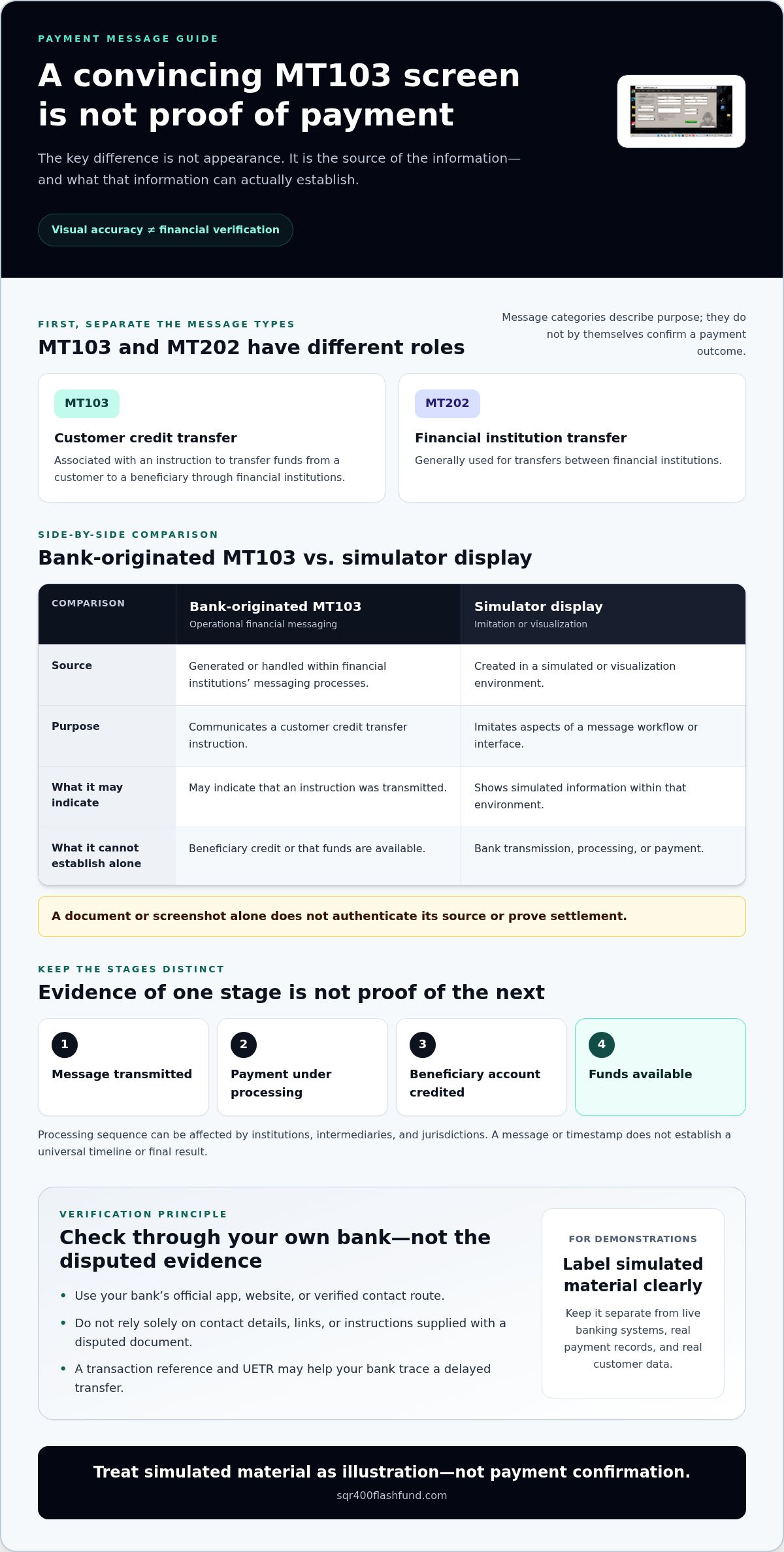
MT103 is a SWIFT message type associated with a customer credit transfer. It relates to an instruction to transfer funds from a customer to a beneficiary through financial institutions. MT202, by contrast, is generally used for transfers between financial institutions. These terms identify message categories and purposes; they do not, on their own, establish that a beneficiary’s account has been credited or that funds are available.
For an overview of SWIFT message types, including MT103, see the broader message-type reference. Understanding the terminology helps distinguish a payment instruction from the outcome of processing it.
What does a simulator actually represent?
A simulator may imitate a visual workflow or display for training, interface prototyping, or an internal demonstration. Its output represents simulated information within that environment. Familiar terminology or a realistic-looking interface does not make that output a genuine bank message.
Keep the boundary clear:
- Training or visualization: Illustrates a process or interface in a simulated setting.
- Production financial messaging: Involves communications handled through financial institutions’ operational systems.
- Payment outcome: Requires confirmation through appropriate banking channels; a simulation cannot establish it.
Appearance is not authentication. A screenshot or document may be copied, edited, or generated outside a bank’s systems, so visual details cannot establish its origin or prove settlement. A simulated liquidity or balance display is not accessible or spendable money. Treat an mt103 202 simulator as a visualization tool, and keep its outputs separate from real payment records and claims.
How does a real MT103 differ from a simulator display?
The difference is not how convincing a screen looks. It is where the information comes from, what operational event it records, and what that event can establish. A bank-originated message and a simulator display may use similar terminology, but they are not interchangeable evidence.
| Comparison | Bank-originated MT103 | Simulator display |
|---|---|---|
| Source | Generated or handled within financial institutions’ messaging processes. | Created in a simulated or visualization environment. |
| Purpose | Communicates a customer credit transfer instruction. | Imitates aspects of a message workflow or interface. |
| Evidential limit | May indicate that an instruction was transmitted, but does not alone establish beneficiary credit or available funds. | Shows simulated information; it does not establish bank transmission, processing, or payment. |
An MT103 image alone does not prove a completed or settled payment. A document or screenshot can be copied or simulated, so neither its layout nor its displayed details independently authenticate its source. Even information that appears consistent with the structure of an MT103, such as the types of details discussed in MT103 fields for AML monitoring and risk detection, cannot verify a specific transfer by appearance alone.
Message, processing, and settlement are different stages
Payment messaging communicates information between financial institutions. The receiving institution may then process the instruction according to its procedures and the payment route. Beneficiary credit and the availability of funds are separate outcomes. Institutions, intermediaries, and jurisdictions can affect the sequence, so a message or timestamp does not establish a universal processing timeline or final result.
Assess each stage separately: a message may be transmitted, a payment may be under processing, an account may be credited, and funds may become available. Evidence of one stage should not be treated as proof of the next.
Why a convincing interface is not proof
Logos, reference numbers, familiar wording, and displayed balances can be reproduced. A visually consistent interface cannot establish who created the information, whether a bank authenticated or processed it, or whether funds are available to the beneficiary. A balance shown in a simulation is not spendable money.
For a payment claim, use a channel you access independently, such as your own bank’s official app, website, or verified contact route. Don’t rely solely on contact details, links, or instructions supplied with the disputed document. A simulator can illustrate a workflow, but it cannot verify a live payment.
Can an MT103 202 simulator verify funds or payment?
No. An MT103 202 simulator cannot independently verify funds, bank records, or completed settlement. It can represent a workflow or display simulated information, but it has no evidentiary authority over a financial institution’s records. A generated screen cannot confirm that a sending bank transmitted a genuine instruction, that the beneficiary’s account received the funds, or that those funds are available to use.
The distinction is operational, not visual. A simulator output, a payment notice from a sender, and confirmation recorded by the beneficiary’s financial institution are different things. Treating them as equivalent can expose a buyer, seller, or service provider to avoidable loss, especially if goods are released or a transaction is finalized before payment is independently confirmed.
What a simulator cannot establish
A simulated display cannot confirm the origin or status of a SWIFT instruction. It cannot validate bank records, authenticate a message with the relevant institutions, or establish that a transfer reached its destination. Nor can it replace confirmation from the financial institutions involved.
Assess a payment document according to what it actually establishes. A notice or copy may present a claim about a transaction, but it is not the same as confirmation in the beneficiary’s own account. A displayed balance in a simulated environment is not evidence of accessible funds.
Why proof-of-funds claims require care
Consider a transaction where one party sends a screenshot and asks the other to release goods before the incoming payment appears in their account. The screenshot could be a demonstration, a copied document, or a genuine notice that still does not establish credit or availability. Its appearance cannot tell you which situation applies.
Pause any consequential decision if the payment claim cannot be independently validated. Access your financial institution through a channel you obtain separately, and ask it to confirm whether funds have been credited and are available. Don’t use contact details, links, or verification instructions supplied only with the disputed evidence. Urgency, a reference number, or a convincing interface is not a substitute for confirmation.
A simulator visualizes payment information; independent financial channels are the appropriate way to confirm a payment’s status or available funds. An mt103 202 simulator may be useful for a clearly labeled demonstration, but it cannot turn simulated information into proof of funds or settlement.
How can you assess an MT103 payment claim safely?
Use an independent verification process, not the appearance of a document or display. If a payment claim involves an mt103 202 simulator, treat the simulated material as an illustration, not confirmation. Focus on what the relevant financial institution can verify through its own records and procedures.
A practical verification sequence
- Pause consequential actions. Don’t release goods, provide services, share credentials, or transfer assets based only on a screenshot, generated document, or sender’s payment notice.
- Access your institution independently. Use a bank app or website you already trust, or contact the institution using details obtained separately. Don’t use phone numbers, links, or instructions found only in the disputed evidence.
- Ask what can be confirmed. Provide relevant transaction information through the institution’s established process, then ask whether funds have been credited and are available. The institution determines what confirmation it can provide.
- Keep the evidence in context. Record who made the claim, when you received it, and what action was requested. A sender-provided reference or notice can help frame an inquiry, but it is not independent proof of payment.
Distinguish between a payment being reported, a message or instruction being processed, and funds being credited and available. Don’t assume one stage proves the next. A simulator display cannot answer those questions because it is not a source of bank records.
When to escalate a questionable claim
Escalate inconsistencies through your organization’s established finance, compliance, or fraud-response process. Examples include a request to act before funds are confirmed, conflicting payment details, or pressure to use contact information supplied with the claim. A discrepancy warrants controlled review; it does not, by itself, establish intent or prove misconduct.
Preserve the original communication and materials in the form received. Keep relevant records and follow your organization’s procedures for documenting the matter. Don’t edit or annotate the original file in a way that could change the record; make separate notes instead. If a reporting obligation may apply, follow the requirements relevant to your institution and jurisdiction rather than relying on a universal checklist.
Decision rule: If the appropriate institution cannot independently confirm the payment, defer any irreversible transaction step and follow the established escalation process. This keeps a visual claim separate from verified financial evidence.
Choosing an MT103 simulator for legitimate demonstrations
An mt103 202 simulator should serve a defined, legitimate purpose, such as staff training, interface prototyping, or an internal demonstration. Its role is to illustrate concepts, not to represent a live payment. Set that boundary before a demonstration begins, and make it clear in every output and accompanying explanation.
Safeguards for training and demonstration environments
Use fictional scenarios and non-sensitive test data. Keep demonstration tools and materials separate from live banking systems, real customer records, and decisions about funds or counterparties. A training screen should never determine whether to release goods, services, credentials, or assets.
- Label outputs prominently: State that the material is simulated and is not evidence of a transaction, a bank-issued record, or available funds.
- Control the context: Present demonstrations in a clearly identified training or prototype setting, not as operational payment documentation.
- Protect sensitive information: Use fictional account details and scenarios rather than actual customer or account data.
- Maintain separation: Keep simulated outputs out of payment approval and settlement workflows.
If a tool or presentation encourages people to treat a simulated message as proof of payment, it crosses the essential boundary between visualization and financial evidence. Clear labels and controlled use reduce the risk of confusion, but they do not turn simulated information into a bank record.
Where to find authoritative payment information
For official messaging and standards context, consult SWIFT’s own materials. For a specific transfer, use the relevant financial institution’s verification process. Its records and procedures, not a demonstration interface, are the appropriate basis for assessing payment status.
The MT103 simulation tool guide discusses visualization. It is not a substitute for bank verification or evidence of a financial transaction. Keep that distinction visible whenever simulated payment workflows are used.
Bottom line: Use simulators for clearly labeled education and demonstrations. For standards questions, consult official SWIFT resources; for payment claims, rely on the relevant institution’s own confirmation.
Verify the payment, not the display
An mt103 202 simulator can illustrate a messaging workflow, but it cannot verify a bank instruction, prove that funds are available, or confirm settlement. Keep simulated outputs separate from payment evidence. Treat a document or screenshot as a claim to assess, not a substitute for confirmation through the relevant financial institution’s own procedures.
For official context on SWIFT messaging standards and services, consult SWIFT’s official resources. For a specific payment, rely on the institution involved to confirm what its records and procedures can establish. This separation helps protect decisions involving goods, services, and assets from being driven by appearances alone.
Use simulation only for clearly labeled demonstrations, and keep payment verification independent. Explore SQR400 Flash Fund’s SQR400 v5.8 Pro for software designed to simulate financial transactions and banking-interface visualizations. Keep simulated displays distinct from real funds and bank records.
Frequently Asked Questions
Can an MT103 202 simulator prove that a payment was sent?
No. An mt103 202 simulator can display an imitation or demonstration, but that display does not establish that a bank sent a genuine payment instruction. It also cannot show that the beneficiary received funds or can access them. Seek confirmation through financial institution channels you obtain independently, and follow the procedures relevant to your organization and transaction before acting on a payment claim.
Is an MT103 the same as proof of funds?
No. An MT103 is a payment-message type, not proof that funds are available to a beneficiary. A message copy or screenshot may relate to an instruction, but processing, beneficiary credit, and availability of funds are distinct stages. Treat the claim as unverified until it is confirmed through appropriate independent channels, such as the relevant institution’s own records and verification process.
How can I verify a purported MT103 payment safely?
Contact the relevant financial institution using details you obtain independently, then follow its verification process. Don’t rely only on a document, screenshot, link, phone number, or instructions provided with the payment claim. If a transaction is consequential, pause action until suitable confirmation is available. Record the claim and escalate concerns through established finance, compliance, or fraud-response procedures.
Can a simulator connect to SWIFT or move real money?
Don’t assume a simulator connects to SWIFT, communicates with a bank, or moves funds. A software display alone cannot demonstrate those capabilities. Production messaging and payment processing involve financial institutions and their controls. Protocol names or realistic-looking screens do not establish operational access. Treat simulation as visualization unless the relevant institution independently confirms a specific payment through its own procedures.
What is the difference between an MT103 message and payment settlement?
An MT103 message carries information associated with a customer credit transfer; processing and settlement are separate stages. A message copy alone does not establish that the beneficiary’s account was credited or that funds are available. The route and institutions involved can affect how a payment is processed. For a specific claim, contact the relevant institution through an independently obtained channel and follow its verification process.
Should I accept a simulated MT103 as confirmation before releasing assets?
No. A simulated display is not independent confirmation that a payment was made or that funds are available. Pause the release of assets, verify the claim through institutional channels obtained independently, and follow your organization’s compliance procedures. If the claim cannot be confirmed, escalate it through established internal processes. Applicable requirements depend on the transaction and relevant rules, so don’t treat a simulation as a legal or financial determination.