

A convincing payment message is not proof that money moved. MT103 simulation software can create synthetic examples for learning, presentations, or controlled system exercises, but its output cannot establish that a bank sent, received, or settled a real transfer.
That distinction matters as cross-border payment messaging shifts to ISO 20022. Since November 2025, the interbank payment instruction format has moved from legacy MT messages to the XML-based pacs.008. When evaluating a simulator, consider what it represents, how it handles test information, and whether its output is clearly distinguished from genuine payment records.
This guide covers appropriate simulation uses, evaluation criteria, and ways to verify an actual payment through authenticated banking channels. SQR400 Flash Fund’s SQR400 software creates simulated financial visualizations, including MT103-related representations. Those visualizations do not verify funds or transfer money. For more information, visit sqr400flashfund.com, contact Telegram, or email support@sqr400flashfund.com.
Key Takeaways
- Use mt103 simulation software for learning, presentations, and controlled exercises, not as evidence that funds moved.
- Use synthetic datasets for repeatable exercises and keep customer transaction records out of test materials.
- Compare tools by purpose, data type, environment, governance, and documented limitations.
- Clearly label simulated liquidity and keep it separate from verified payment records.
- Define the exercise, control the environment, document results, and assign responsibility for data and review.
What MT103 simulation software does, and what it does not prove
MT103 simulation software creates representations for learning, presentations, or controlled exercises. It can help users review message concepts and explore workflows using synthetic information. It cannot establish that a payment was initiated, received, or settled. A simulated message, status display, or balance is a visualization, not a record of funds moving between accounts.
Keep three activities distinct. Synthetic test data provides invented inputs for exercises. Message-format learning helps users understand how payment information is organized. Actual payment processing takes place through financial institutions and their authorized channels. A simulator can represent selected concepts or financial visualizations, but familiar-looking output does not make it part of a real payment.
What does an MT103 simulator model?
A simulator may represent message structures, selected data fields, or steps in a non-production workflow. For instance, a training exercise might use invented sender and beneficiary labels to show how information is reviewed. These are illustrative inputs, not payment records. A financial simulation tool may also display simulated liquidity or balances in a banking-style interface. The display remains simulated, and its appearance does not verify a real account balance. What a tool represents depends on its features and the context in which it is used.
That scope matters as payment messaging evolves. MT103 remains a familiar term for a legacy message format, while interbank cross-border payment instructions have moved to ISO 20022 pacs.008. A demonstration of MT103 concepts should not be mistaken for a live network connection or proof that a production message was accepted. Identify what an exercise represents before drawing conclusions from its output.
Simulation versus a real bank transfer
Visual similarity is not authentication. A message-shaped screen or simulated liquidity display can resemble financial information without originating from a bank or matching an account transaction. A simulator does not itself move money between accounts, and a simulated balance is not verified funds. Do not use simulated output as evidence of payment, settlement, or available funds.
Only authenticated banking channels can verify whether a real transfer occurred. If payment status is uncertain, contact the relevant financial institution through its established channels and follow its normal confirmation process. Treat simulated output as a visualization or exercise artifact, and keep it clearly separate from verified payment records.
Before reviewing or sharing a result, identify its environment and data type. Label examples as synthetic, preserve that context when sharing outputs internally, and avoid putting customer transaction records into an exercise unless the use is specifically authorized and governed. These controls reduce the risk that a simulation is mistaken for an operational payment record.
The practical test is simple: ask what the software represented, which data it used, and whether an authenticated financial institution independently confirms the transaction. If the only evidence is a simulator’s display, the transfer remains unverified.
How MT103 simulation supports controlled testing and training
Controlled exercises let teams study payment-message concepts without relying on live customer records. Staff can learn terminology, technical teams can assess how an interface handles fictional inputs, and operations teams can rehearse non-production workflows. Repeatable scenarios make it easier to observe whether a system displays information consistently or whether an exercise reveals gaps in understanding.
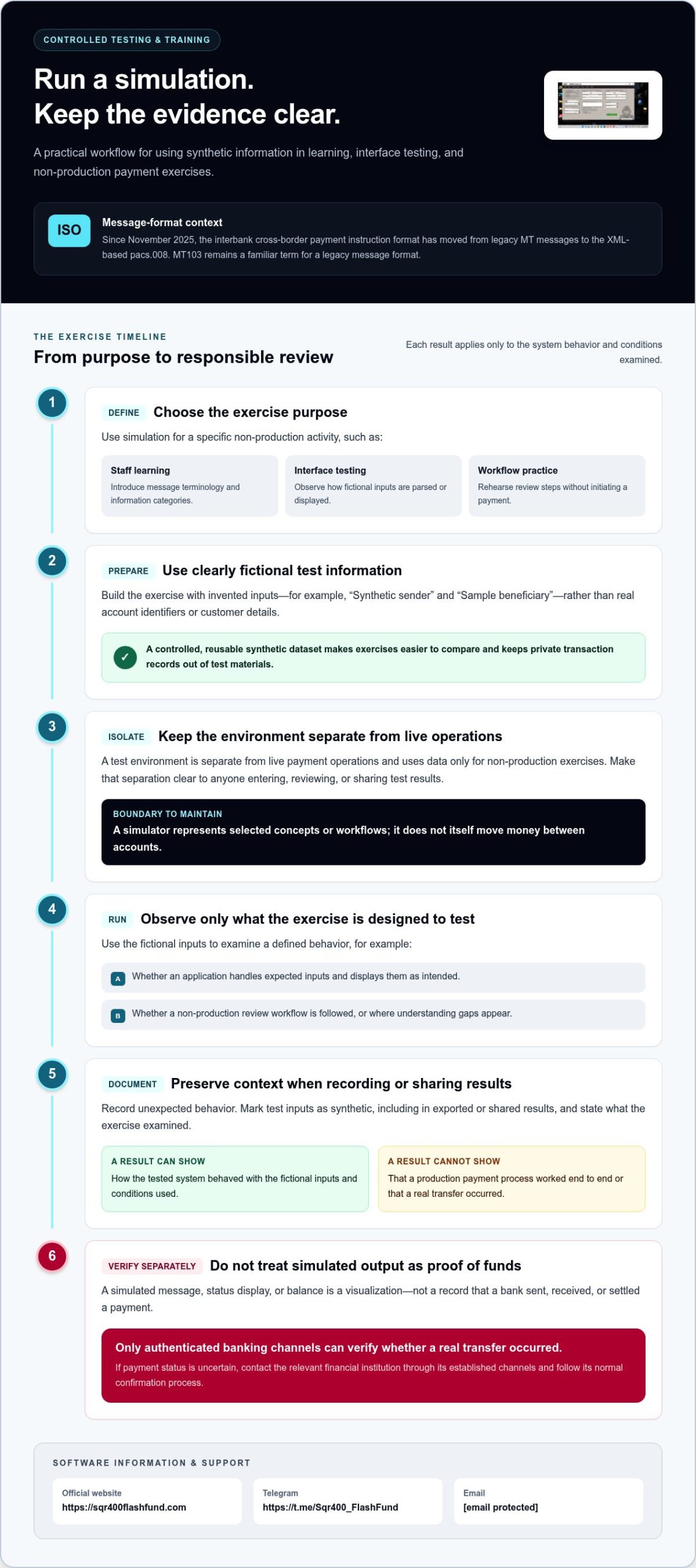
A test environment is separate from live payment operations and uses data only for non-production exercises. Make that separation clear to anyone entering, reviewing, or sharing test results. It also defines what a result means: a successful exercise demonstrates only the behavior tested in that environment.
- Staff learning: Introduce message terminology and information categories through guided exercises.
- Interface testing: Observe how a system parses or displays fictional inputs, and record unexpected behavior.
- Workflow practice: Rehearse review steps in a non-production setting without initiating a payment.
Testing systems with synthetic transaction data
Use clearly fictional records to test whether an application handles expected inputs, displays them as intended, and follows a defined test workflow. For example, an exercise might use labels such as “Synthetic sender” and “Sample beneficiary,” without real account identifiers or customer details. Reusing a controlled dataset makes comparisons easier and keeps private transaction records out of the test. Results apply only to the system behavior and conditions examined.
Mark test inputs as synthetic, including in exported or shared results. Don’t treat a passing display check as proof that a production payment process works end to end. It verifies a limited behavior, such as whether fictional fields appear as expected, not the integrity of a live financial network or the status of a real transfer.
Training teams on message workflows
Guided exercises can help staff recognize message structure, terminology, and the sequence of a non-production review. A facilitator might ask learners to identify broad information categories in an explicitly synthetic example, then explain how those categories support the exercise. The SWIFT User Handbook can serve as a standards-learning reference. Use training material to understand concepts, not as instructions to initiate or validate a real transfer.
Start with a specific learning objective. Is the team learning terminology, checking that a screen presents information clearly, or practicing an internal review sequence? Record the expected behavior and compare it with what participants or the test system actually do. Keep conclusions narrow and documented. Training feedback can inform learning, while technical findings can guide further testing. Neither confirms payment activity.
Teams assessing mt103 simulation software can use these boundaries to keep exercises focused on learning and controlled system behavior. SQR400 Flash Fund’s SQR400 software provides simulated financial visualizations, not actual transfers or independent verification of funds. Explore financial simulation software for more information. For inquiries, use Telegram or email support@sqr400flashfund.com.
How to compare MT103 simulation software for your use case
Start with the task, not the screen design. The right tool depends on the objective, not on how realistic its interface appears. A polished banking-style display does not establish standards coverage, controlled data handling, or suitability for a particular exercise. Compare purpose, data type, environment, governance, and limitations before weighing presentation.
Purpose: Identify whether the tool is intended for staff learning, financial visualization, software testing, or non-production workflow exercises. These are distinct requirements.
Data type: Establish whether examples are synthetic and how test inputs are identified. A sample dataset should not be confused with customer transaction data.
Environment: Determine whether the activity is confined to a non-production setting or involves production payment infrastructure. Simulation and live payment processing are different categories.
Governance: Review what the documentation says about access, storage, separation, and ownership of test data. Don’t infer controls that the documentation does not state.
Limitations: Note what the tool does not model or validate. Clear boundaries make conclusions from an exercise more reliable.
Match the tool to the task
For staff learning, assess whether exercises explain message terminology and concepts clearly. For system testing, focus on whether synthetic inputs can be reused to examine parsing, display, or other defined behavior. For workflow design, confirm that the exercise remains non-production. Standards-training resources teach concepts; simulation software represents selected data or visualizations; payment infrastructure processes actual transactions. These serve different purposes.
Write down the desired result before comparing options. A team checking whether a screen presents fictional information consistently has a different objective from staff studying payment-message terminology. That distinction determines which documentation and test evidence matter. Don’t treat a tool’s appearance as a substitute for a clearly stated use case.
Compare data and environment controls
Review how test data is labeled, where it is stored, and how the documentation distinguishes it from production records. Check whether the described test environment is separate from live operations, and whether supported uses and limitations are stated plainly. Marketing language alone does not demonstrate security, compliance, or protocol support. Look for specific documentation about the relevant scope rather than inferring a capability from a familiar-looking interface.
A practical comparison record can note each tool’s stated purpose, input-data type, environment, documented governance, and explicit limitations. Mark a criterion “not documented” rather than assuming a control exists. This keeps the evaluation reviewable and prevents visual similarity or broad claims from carrying more weight than verifiable information.
SQR400 Flash Fund offers SQR400 financial simulation software, including SQR400 v5.8 Pro. Its simulated visualizations are not payment records or proof that funds are available. Use the comparison framework to assess financial simulation software against a defined learning, presentation, or testing objective. A simulator is not a substitute for standards education or production payment infrastructure.
Prevent confusion between simulated MT103 output and proof of funds
Simulated liquidity is not verified liquidity. A balance visualization, message example, or screenshot produced through a simulation does not establish that funds exist, a payment was sent, or settlement occurred. Make the distinction clear anywhere synthetic output is stored, reviewed, or shared. The context matters more than how convincing a screen may look.
Presentation can create confusion. A screenshot may become detached from the exercise that produced it, and a simulated interface may look familiar to someone who has not seen the test context. Neither format independently confirms a transaction. Keep synthetic outputs within their clearly disclosed simulation or training context, and do not present them as authenticated bank records or evidence of available funds.
Controls for handling synthetic outputs
Make the synthetic status visible on the material itself, not just in a separate file name or verbal explanation. A label such as “SYNTHETIC TEST DATA” or “SIMULATED VISUALIZATION, NOT A PAYMENT RECORD” helps preserve context when a document or screenshot is viewed alone. Use labels consistently across exercise files and internal reviews.
- Keep examples within authorized learning, presentation, or non-production testing activities, and identify them as simulated.
- Separate synthetic datasets from customer information, account records, and production transaction data.
- Preserve the synthetic-data label when outputs are stored or shared internally.
- Describe results as observations from a simulation, not as payment evidence.
These measures reduce the chance that a simulation is confused with a customer-facing record. They also help teams interpret results accurately: a demonstration can illustrate a concept or show how a test system behaved, but it cannot establish a customer balance or transaction event. mt103 simulation software should be treated as a source of simulated output, not a payment-verification channel.
What counts as independent payment verification?
For a question about actual payment status, use the relevant bank or financial institution’s authorized channels. Check the transaction through your established banking access and follow the institution’s normal process. A screenshot, displayed message, or simulated balance cannot independently confirm receipt or settlement.
Keep payment verification separate from a simulation exercise. If a test display indicates a successful workflow, record that only as a test result. If the question is whether a real transfer reached its destination, rely on confirmation from the relevant financial institution, not on simulated material’s visual appearance.
The operational rule is straightforward: label simulated output, keep it distinct from production records, and use bank channels to verify real payment status. Clear boundaries protect the integrity of both training exercises and financial communication.
A responsible workflow for adopting MT103 simulation software
A controlled rollout starts with a defined question, not a visual demonstration. Decide whether the exercise is for staff learning, interface testing, financial visualization, or workflow design. Then define what information will be used, keep any testing outside live payment operations, and document what the exercise did and did not establish. This gives teams a clear basis for reviewing results without confusing simulated output with payment evidence.
Plan a non-production pilot
Before selecting a tool, write down the test question and the result that would count as success. For example, a pilot might assess whether a system presents fictional message information consistently. It should not be framed as a test of whether a real transfer was sent or settled. Use synthetic information for testing, and define the exercise’s scope so findings stay tied to the behavior actually examined.
- Define the purpose. State the learning objective or system behavior the exercise will examine.
- Select synthetic data. Use fictional inputs without customer transaction records or real account details.
- Isolate the environment. Keep testing separate from live payment operations and customer-facing records.
- Document outcomes. Record observations, limitations, and any follow-up testing needed.
Assign one accountable owner for data labeling, access, retention, and review of the pilot results. That owner should ensure the synthetic designation remains visible when materials are saved or shared and that access is limited to the exercise’s intended participants. Keep training demonstrations and simulated financial visualizations distinct from real payment evidence throughout the exercise, including after it ends.
Record limitations in plain language. A result may show that a particular screen displayed test inputs as expected under the conditions used. It does not establish that other systems behave the same way, that a production workflow is validated, or that a payment occurred. Clear limits make the pilot more useful: findings remain precise, reviewable, and proportionate to the test.
Choose the next learning step
Software simulation and standards education serve different objectives. Use a simulator for a bounded non-production exercise or clearly identified financial visualization; use structured instruction when the goal is a deeper understanding of SWIFT message practices. The official SWIFT MT 103 training provides a standards-focused learning route. For the status of an actual payment, use the relevant financial institution’s authorized channels.
Keep the relevant MT103 simulation guide available as protocol context while planning the pilot, but base adoption decisions on the documented objective, data boundaries, and limitations of the exercise. A disciplined workflow supports learning and testing without implying that simulated output authenticates a bank message or verifies funds.
Set a clear standard for your next simulation
Turn your evaluation into an operating standard before the next exercise begins. Define who can approve a simulation, who owns its synthetic data, and how findings may be used in internal decisions. This gives teams a consistent basis for adopting mt103 simulation software without letting a test result drift beyond its intended purpose.
Make the boundary part of routine review: every exercise should have a stated objective, an accountable owner, and a clear record of what its results can support. Keep decisions about real payment status separate, using the relevant financial institution’s authorized channels. That discipline preserves the value of simulation while grounding operational conclusions in appropriate evidence.
For more information about SQR400 financial simulation software, explore SQR400 software. Contact the team on Telegram or email support@sqr400flashfund.com. Use simulated output transparently, and rely on authenticated bank channels for proof of an actual payment.
Frequently Asked Questions
What is MT103 simulation software?
MT103 simulation software creates representations for learning, financial visualization, system tests, or workflow exercises. A team might use a fictional scenario to discuss where message information appears in an interface. The tool’s documented scope determines what it represents. Treat generated material as simulated, and record the exercise’s purpose so a later reviewer can distinguish it from an operational payment record.
Can an MT103 simulator prove that money was sent?
No. A simulator’s output cannot establish that a financial institution processed a transfer. If a counterparty shares an image or message display, its appearance is not confirmation. Check the transaction through your own authorized banking channel and follow the institution’s process. That independent check addresses payment status; a simulation documents only what it represents or what happened during its exercise.
Is synthetic MT103 data suitable for software testing?
Yes. Synthetic data can support tests of defined behaviors, such as whether an application accepts fictional inputs or displays information in expected fields. Before running a test, write down the expected result and conditions being examined. If the application passes, report that limited outcome rather than assuming it validates every workflow, production configuration, or live payment scenario.
What is the difference between MT103 training software and a payment system?
Training software supports instruction or practice; a payment system handles payment processing through authorized financial infrastructure. A training session can ask learners to explain message terminology, while a real transaction requires the relevant payment process and institution. A simulator does not perform that operational role. Choose the environment that matches the task, and keep their records and conclusions distinct.
How should a company evaluate MT103 simulation software?
Start with a short evaluation brief: intended users, exercise objective, test inputs, and evidence that will count as a successful exercise. Then compare the tool’s documentation against that brief, including its stated scope and limits. If the goal is interface testing, for example, assess whether the described use covers the behavior being examined. Don’t use visual resemblance to a bank interface as a measure of capability.
How can I verify whether an MT103 payment is real?
Use the relevant financial institution’s authorized channels to confirm transaction status. Have the institution’s own reference information available and follow its normal process for account-specific questions. Don’t treat a screenshot, forwarded file, or demonstration as independent confirmation. A simulation cannot resolve uncertainty about an actual payment; it remains a separate visualization or test artifact.
Can synthetic MT103 messages be used with real customer data?
Prefer fictional inputs for ordinary test exercises. Before using customer information, have the appropriate internal data owner assess the purpose, access, retention, and environment under the organization’s established governance process. Don’t copy a customer transaction into a test dataset simply because it resembles the scenario needed. Label simulated outputs clearly and preserve their context during review and storage.