


A simulated transaction can expose a workflow failure before a live payment does, but only when the test stays in a controlled, clearly labeled environment. That boundary is central to managing risk with simulated transactions: a sandbox result can help teams examine system behavior without using real funds, but it is not evidence of a payment, settlement, bank authorization, or available balance. If you’re concerned about exposing customer data or making decisions based on misleading test results, make those limits explicit.
Testing can reduce operational uncertainty when access is restricted, test records are clearly identified, and results are interpreted within the limits of the simulation. This guide covers appropriate uses, practical controls for sensitive information, and how to turn test outcomes into cautious operational decisions. It also explains when a decision requires independent, verifiable financial evidence rather than a simulated display or message. Treat simulation as a testing instrument, not proof of funds or completed payment.
Key Takeaways
- Use transaction simulations to examine workflows, train staff, and test resilience without moving real funds.
- For managing risk with simulated transactions, define authorization, scope, data handling, and disclosure controls before testing begins.
- Compare sandbox results with live-payment evidence carefully. Simulated records cannot confirm funds, settlement, or bank authorization.
- Keep simulation labels visible on interfaces and records so test outputs aren’t mistaken for real financial activity.
- Assess vendor claims and documentation independently, and seek qualified advice about obligations that apply in your jurisdiction.
Managing risk with simulated transactions: what they can and cannot show
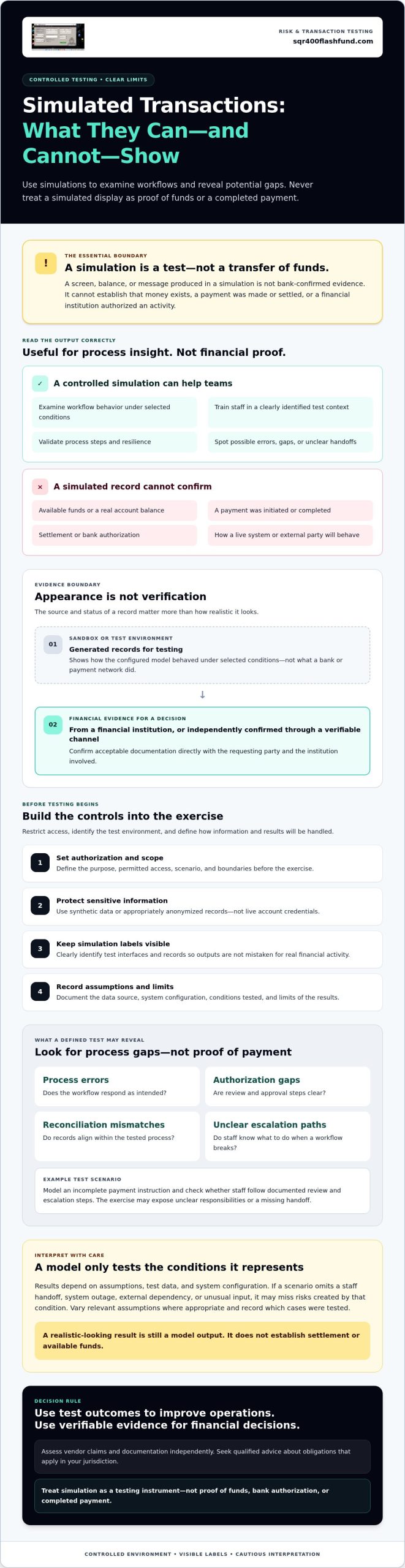
Managing risk with simulated transactions starts with a clear boundary: a simulated transaction is a test or modeled event, not a transfer of funds. A screen, balance, or message produced during a simulation is not bank-confirmed evidence. It cannot establish that money exists, that a payment was made or settled, or that a financial institution authorized an activity.
This distinction separates legitimate testing from demonstrations that could mislead a counterparty. Use simulated outputs to assess a workflow or train staff in a clearly identified test context. Don’t present them as live account records or financial proof. If another party could reasonably mistake a simulation for a real transaction, add clearer labels or don’t use it for that purpose.
What does a transaction simulation represent?
A simulation models selected inputs, events, and outputs. For example, a team might test how a payment workflow responds to an incomplete instruction or unexpected system response without initiating a live payment. The result shows how the configured model behaved under those conditions, not what a bank or payment network did.
Outputs depend on assumptions, test data, and system configuration. Some models use random sampling, including Monte Carlo simulations, to explore possible outcomes across varied inputs. Those results can help identify patterns or process gaps, but they remain model outputs. A realistic-looking display does not establish settlement or available funds.
Where simulation ends and real financial evidence begins
A sandbox or test environment is designed to examine behavior without moving actual value. Its records are generated for testing. Live financial evidence, by contrast, comes from a financial institution or is independently confirmed through a verifiable channel. The source and status of a record matter more than its appearance.
Counterparties making financing decisions need genuine, verifiable evidence appropriate to the decision. A simulated balance or transaction message cannot substitute for it. For further context, see a proof of funds software guide, but treat any guide or software display as informational, not as a replacement for evidence verified by the relevant financial institution. When evidence is required, confirm acceptable documentation directly with the requesting party and the institution involved.
How simulated transactions help assess risk in controlled testing
Controlled simulations let teams examine how a process responds to defined conditions without sending a live payment or exposing actual funds to the test. They can support staff training, workflow validation, and resilience exercises when the environment is authorized, isolated, and clearly identified as simulated. Their value is diagnostic: a test can reveal how a process behaves under selected conditions, not predict or guarantee what will happen in a live operation.
For example, a team might model an incomplete payment instruction and check whether staff follow documented review and escalation steps. The exercise can reveal unclear responsibilities or a missing handoff before the workflow is used operationally. Controlled simulations test processes and expose potential gaps; they do not prove that a real transaction was initiated, completed, or settled.
Live electronic payment systems involve exposures that a sandbox does not automatically reproduce. The Federal Reserve Bank of New York discusses emerging retail payment risks, including data security and fraud considerations. Use that context to shape relevant test questions, while recognizing that simulated results cannot establish how a live system or external party will behave.
Which risks can a controlled simulation help reveal?
With a defined scope, a test can help identify process errors, authorization gaps, reconciliation mismatches, or unclear escalation paths. Use synthetic data or appropriately anonymized records rather than live account credentials. Before the exercise, document its purpose, assumptions, data source, system configuration, and limits. This makes results easier to interpret and helps protect sensitive information.
How simulation assumptions affect the result
A scenario tests only the conditions it represents. A model that omits a staff handoff, system outage, external dependency, or unusual input may miss the risk created by that condition. Vary relevant assumptions where appropriate, then record which cases were tested and which remain untested. A passing result means the defined scenario produced an expected outcome under its test conditions. It is not a forecast, guarantee, or independent validation of the live process.
When managing risk with simulated transactions, keep conclusions proportional to the evidence. Use findings to prioritize review, refine procedures, or plan further testing. Don’t treat model outputs as proof that a control will work in every real-world situation. Keep test observations separate from operational decisions, and require separate review before applying findings to live payment processes.
Simulated transactions versus live payments: compare evidence, exposure, and limits
Visual realism is not verification. A simulated interface may display transaction details or a balance, but its appearance cannot confirm that a bank received an instruction, funds moved, or settlement occurred. The operational difference is decisive: sandbox events test a process; live payments transfer real value through financial systems and create records that must be verified at their source.
Purpose: A simulation tests a defined workflow or scenario. A live payment executes a financial instruction.
Data: A simulation should use synthetic or appropriately anonymized test data. A live payment may involve real account and payment information.
Fund movement: A simulation does not move funds. A live payment can move real value, subject to the applicable process and status.
Evidence value: Simulation output documents test behavior, not a payment or available funds. Live-payment evidence must come from an appropriate, verifiable source.
Oversight: Simulation requires clear authorization, scope, and labeling. Live payments require the controls and review applicable to the operation.
What does a simulation prove compared with a live transaction?
A simulation supports conclusions only about the scenario, environment, data, and assumptions actually tested. If a test shows that a workflow handled a particular input as expected, it does not prove that a real payment would succeed or that a displayed amount exists. For context on protocol-style displays, an MT103 simulation tool guide may explain format visualization, but that visualization is not bank confirmation.
For payment status, settlement, or available funds, seek confirmation through an appropriate verifiable source, such as the relevant financial institution. Don’t use simulated records to influence lending, investment, or commercial decisions. A polished screen is still a simulation if no independent source confirms the underlying financial event.
When is simulation appropriate, and when is it not?
Use simulations for authorized internal testing, education, and documented process exercises. Label simulated records and interfaces clearly, and restrict their use to the stated purpose. Never use a simulated record to impersonate a bank or claim funds are available. If an external demonstration could be misunderstood, pause and seek review from qualified compliance, legal, or risk professionals before sharing it.
Managing risk with simulated transactions means controlling both the test and how its outputs are interpreted. Keep test results separate from evidence used to verify real financial activity.
A practical risk-control framework for transaction simulations
Managing risk with simulated transactions requires controls across the entire exercise, not just a test environment. Authorization, isolation, disclosure, and review are core simulation safeguards. Assign an accountable owner and keep simulated labels visible on records and interfaces from setup through reporting. This helps prevent test outputs from being confused with live financial evidence.
- Authorize the exercise. Record the accountable owner, permitted participants, legitimate purpose, and approved systems. Define who can approve changes or stop the exercise.
- Define scope and boundaries. Specify the workflows and scenarios in scope, the test data to be used, and prohibited uses. Set stop conditions in advance, such as unexpected access to a live system or exposure of sensitive data.
- Isolate the environment. Use approved test systems with access limited to authorized participants. Exclude real credentials, unauthorized accounts, and unnecessary personal or financial information. Prefer synthetic or appropriately anonymized data.
- Test with clear labels. Mark every simulated record, message, and interface as a test output. Keep those labels intact when capturing, exporting, or sharing results internally.
- Review findings. Compare outcomes with the exercise’s stated objectives and assumptions. Separate observed test behavior from conclusions about live operations, then assign corrective actions to an accountable owner.
- Retain or remove records. Document what will be retained, where it will be stored, who can access it, and when it will be deleted or archived. Follow approved retention and privacy requirements.
Set authorization, scope, and data boundaries
Before testing begins, confirm that the owner has authority over the systems and data included. Specify the participants and permitted activities. Don’t use live credentials or access accounts without authorization. If the purpose or data boundaries are unclear, defer the exercise until they’re resolved.
Review results and close the exercise safely
Maintain an audit record of approvals, scope, assumptions, findings, and corrective actions. At closeout, remove or archive test data according to approved requirements and verify that simulated labels remain attached to retained outputs. Escalate suspected misuse, data exposure, or claims that misrepresent simulated records through established organizational channels.
Before applying findings to live processes, confirm that the review supports that decision. A simulation can inform risk controls; it cannot confirm real funds, payment, settlement, or bank authorization.
Choose responsible next steps before using transaction simulation software
Before selecting or using a tool, confirm that the exercise has a legitimate purpose and a defined owner. Managing risk with simulated transactions depends on whether the setup, data, and intended use can be independently assessed. If the goal involves financing, investment, or commercial negotiations, use genuine records verified through appropriate financial channels, not simulated displays.
Use this decision checklist before proceeding:
- Purpose: Is the activity limited to authorized testing, training, or another clearly stated legitimate use?
- Authorization: Do you have permission to use the systems, data, and accounts involved, with an accountable person overseeing the exercise?
- Data handling: Can you use synthetic or appropriately anonymized data, restrict access, and establish retention and deletion decisions?
- Disclosure: Will every output remain clearly labeled as simulated, including if it is exported or shown to others?
- Review: Have qualified reviewers assessed vendor statements, available documentation, and obligations that may apply in each relevant jurisdiction?
Questions to ask before selecting a simulation tool
Ask whether the tool can be used in an isolated, authorized test environment and whether simulated records and interfaces can be clearly labeled. Request documentation to support security and privacy claims. Don’t infer compliance, bank approval, or suitability for regulated use from marketing language alone. Confirm who can access test data, how long it is retained, how deletion is handled, and what process applies if an incident occurs. Verify product-specific claims independently before relying on them.
How to present simulation findings responsibly
Label each output as simulated and state the exercise’s scope, assumptions, and material limitations. Keep test materials separate from bank statements, payment confirmations, and financing evidence. If a result is shared beyond the testing team, explain what it demonstrates and what it cannot establish. A simulated screen or message is not proof of funds, a completed transfer, settlement, or bank authorization.
For jurisdiction-specific financial, privacy, or consumer-protection questions, seek advice from qualified counsel. SQR400 Flash Fund offers transaction simulation software, including SQR400 v5.8 Pro. Its stated product purpose does not make simulated displays evidence of real funds or payment. Assess product claims and intended use independently before proceeding.
Apply simulation results with clear operational boundaries
Effective managing risk with simulated transactions means using test results to improve defined workflows, not treating them as proof of live financial activity. Keep simulated records clearly labeled, protect the data used in testing, and limit conclusions to the assumptions and conditions actually examined.
For decisions involving financing, investment, or commercial negotiations, obtain genuine records through appropriate financial channels. Vendor descriptions and product interfaces aren’t independent confirmation of security, compliance, bank approval, or available funds. SQR400 Flash Fund describes its offering as transaction and balance simulation software, not an actual money-transfer service. Assess its stated claims and intended use independently before proceeding.
With clear authorization, careful disclosure, and sound evidence standards, simulation can support more disciplined testing while preserving the distinction between modeled outcomes and real transactions.
Frequently Asked Questions
Can simulated transactions reduce financial risk?
They can help teams examine workflows, train staff, and identify process gaps in an authorized test environment. Managing risk with simulated transactions does not remove exposure from live payments or guarantee that a real transaction will succeed. Results depend on the scenario, assumptions, test data, and review process. Treat them as limited test findings, not evidence of funds, settlement, or bank approval.
Do simulated transactions move real money?
No. A simulation models or displays transaction-related events; it doesn’t itself transfer funds. A generated record or test interface is not a bank transaction, available balance, or confirmation of settlement. If a business decision depends on proof of funds or payment, request genuine evidence through appropriate financial channels and verify it independently with the relevant institution or an accepted verification process.
Can a simulated transaction be used as proof of funds?
No. Simulated material cannot independently confirm an account balance, available liquidity, or completed transfer. Presenting it as genuine financial evidence may mislead a counterparty and create legal, commercial, or reputational risk. For financing, investment, or business negotiations, use verifiable documentation issued or confirmed through the relevant financial institution. Keep test records clearly labeled and separate from materials used to support financial decisions.
How do teams keep transaction simulations safe?
Set a legitimate purpose, obtain authorization, and isolate the test environment before running a scenario. Use approved synthetic or appropriately anonymized data, restrict access, and label every output as simulated. Document the assumptions, approvals, findings, and retention decisions. If testing touches sensitive systems, personal information, external counterparties, or regulated activities, involve qualified security, privacy, legal, or compliance professionals before proceeding.
What is the difference between a sandbox and a live payment?
A sandbox is a controlled environment for testing software or workflows, generally without transferring real funds. A live payment uses financial infrastructure to move real value and may create actual obligations or settlement. Sandbox results apply only to the conditions tested. They don’t confirm that a live payment will complete, that a bank has authorized it, or that funds are available.
Are simulated bank balances reliable evidence of liquidity?
No. A displayed or generated balance is a simulation unless an appropriate financial institution independently confirms the underlying information. Its appearance alone doesn’t establish account ownership, available funds, or a transferable balance. For a credit, transaction, or investment decision, use genuine, verifiable evidence and follow the recipient’s documented verification process. Don’t treat a simulated screen or message as financial confirmation.
What should a risk review include before running a transaction simulation?
Review the exercise’s purpose, authorization, scope, test environment, data sources, access controls, disclosure, and retention plan. Record assumptions, define how findings will be reviewed, and establish escalation steps. Confirm that simulated outputs are clearly labeled and cannot be mistaken for live records or shared as financial evidence. If contractual or regulatory obligations may apply, seek advice from qualified professionals in the relevant jurisdiction.