


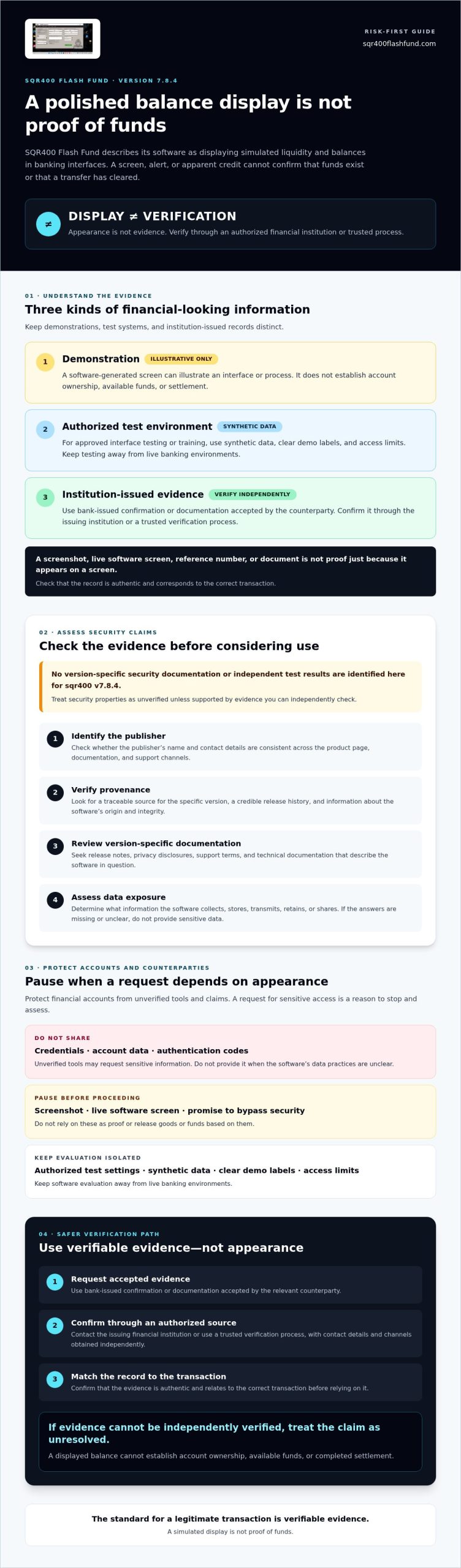
What if a polished balance display proves nothing about the money behind it? SQR400 Flash Fund describes its software as a way to display simulated liquidity and balances in banking interfaces. A screen, alert, or apparent credit is not bank-verified proof of funds, and it cannot confirm that a transfer has cleared.
It’s reasonable to ask whether software handling financial information is secure and authentic. First, separate verifiable evidence from a simulation. Then protect your accounts from unverified tools that may request credentials, account data, or authentication codes. No version-specific security documentation or independent test results are identified here for sqr400 v7.8.4, so do not treat security claims as established facts.
This risk-first guide explains how to check software provenance and assess security claims without exposing financial accounts. It also identifies warning signs, outlines how to seek confirmation through your financial institution, and distinguishes authentic records from simulated displays. If a request depends on a screenshot, live software screen, or promise to bypass security, pause before sharing information or releasing goods or funds. Verifiable evidence, not appearance, is the standard for a legitimate transaction.
Key Takeaways
- A displayed balance cannot establish account ownership, available funds, or completed settlement. Verify payment through your financial institution.
- Assess sqr400 v7.8.4 by checking its publisher, provenance, technical documentation, and data practices before considering an evaluation.
- Separate sales-page claims from independently verified security properties. Treat missing evidence as unresolved risk.
- Keep testing away from live banking environments. Use synthetic data only in authorized test settings with clear demo labels and access limits.
- No version-specific security documentation or independent audit status is established here for v7.8.4. Do not rely on it as proof of funds.
What SQR400 v7.8.4 Can and Cannot Prove About Funds
A financial presentation tool can render balances, transaction screens, or other financial-looking information. That output is a representation, not a bank record. Its meaning depends on where the underlying data came from and whether an authorized institution can independently confirm it. A simulated display does not verify that funds exist in an account.
A visual representation can illustrate financial information; only independently verifiable evidence can substantiate it. A displayed balance does not prove who owns an account, whether funds are available, or whether a payment has settled. A screenshot or live software display is not a substitute for confirmation through the relevant financial institution.
What a financial presentation tool represents
Software-generated screens may have legitimate uses in authorized demonstrations, staff training, or interface testing. In those settings, use synthetic data or an approved test environment, not live account information. Label demonstrations clearly, restrict access, and make their non-production status unmistakable. Without that context, viewers can mistake a polished interface for evidence of a real transaction.
SQR400 Flash Fund describes its software as temporarily displaying simulated liquidity and balances within banking interfaces for presentations and business negotiations. That describes a visual simulation, not an actual money transfer or independent confirmation of funds. Claims involving fictitious financial instruments warrant particular caution. Wikipedia’s overview of Prime bank fraud provides background on a type of bank fraud involving fictitious instruments. The general lesson is to verify the source and validity of financial claims, rather than relying on authoritative-looking terminology or presentation.
What counts as independently verifiable proof of funds
For a legitimate transaction, use bank-issued confirmation or other documentation the relevant counterparty accepts. Confirm it through the issuing financial institution or a trusted verification process, using contact details and channels obtained independently. A reference number or document is not proof just because it appears on a screen. Check that it corresponds to an authentic record and the correct transaction.
Keep three categories distinct:
- Demonstration: Illustrative content used to explain an interface or process.
- Test environment: Authorized system testing with synthetic data and clear demo labeling.
- Institution-issued evidence: Documentation or confirmation that can be verified through an authorized source.
If you need a broader overview of documentation and verification, consult the related Proof of Funds Software guide. For any transaction, rely on evidence accepted by the counterparty and independently confirmed, not a simulated display.
How to Assess SQR400 v7.8.4 Security Claims Before Use
Assess the evidence before considering software that presents financial information. A sales page can make claims, but those claims alone do not establish the software’s origin, security controls, or data practices. No version-specific security documentation or independent test results are identified here for sqr400 v7.8.4. Treat each property as unverified until supported by evidence you can independently check.
Verify publisher, provenance, and documentation
Use this due-diligence sequence. Record what you can verify, and stop if basic questions remain unanswered.
- 1. Identify the publisher. Check whether the publisher’s name and contact details are consistent across the product page, documentation, and support channels.
- 2. Verify provenance. Look for a traceable source for the specific version, a credible release history, and information that helps establish the software’s origin and integrity.
- 3. Review documentation. Seek version-specific release notes, privacy disclosures, support terms, and technical documentation. Confirm that the documents describe the software in question, not just general claims.
- 4. Assess data exposure. Determine what information the software collects, stores, transmits, retains, or shares. If the answers are missing or unclear, do not provide sensitive data.
Marketing language such as “military-grade,” along with endorsements, certifications, or audit claims, should remain unverified until there’s evidence from a source independent of the seller. The U.S. Securities and Exchange Commission’s action on false claims about AI illustrates why technology claims need substantiation. It does not establish anything about SQR400; it reinforces the need to distinguish promotional wording from verified facts.
Review data handling and account-access demands
No presentation tool needs your bank password. Do not enter primary banking credentials, one-time authentication codes, or account recovery details into unverified software. These secrets can give another party access to sensitive accounts. A request for them is a stop signal, not a routine verification step.
Ask for clear answers about data collection, storage, transmission, retention, and sharing, including whether information is sent to third parties. Check whether support terms explain how security or privacy concerns are handled. If the vendor cannot explain the software’s origin, data handling, or support process, stop the evaluation rather than testing it with live financial information.
For context, review the SQR400 v7.8.4 listing, but remember that a product listing is not independent security evidence. Treat claims there as claims to verify, not confirmation that the software passes these checks.
Compare Simulated Displays With Safer Verification Options
Evidence should match its purpose. A visual simulation may illustrate a workflow, while a bank-issued record may support a transaction if its authenticity is confirmed. An authorized test environment can validate system behavior, but its output remains test data. These distinctions matter when evaluating SQR400 v7.8.4 or any financial display tool.
| Evidence type | Source | Verification route | Appropriate use | Risk of misinterpretation |
|---|---|---|---|---|
| Simulated display | Software-generated or entered illustrative data | Check its origin and labeling; it does not independently verify funds | Authorized demonstrations or training, with synthetic data and clear demo labels | High if presented as a live balance, bank confirmation, or completed payment |
| Bank-issued evidence | A financial institution or its authorized process | Confirm with the issuing institution through independently obtained, authorized channels | Transaction review, subject to the receiving party’s requirements | Documents or screenshots can be misrepresented; verify the underlying record directly |
| Authorized test-environment output | A designated test system using synthetic data | Confirm with the system owner or administrator that the environment and output are authorized | Interface, integration, or workflow testing | Test results may be mistaken for production activity if not clearly identified |
Simulation versus bank-issued financial evidence
A simulation is illustrative, not proof of an account or its funds. Bank-issued documentation may provide relevant evidence, but the recipient should verify it through an appropriate direct process. A screenshot alone cannot establish authenticity, account ownership, available funds, or settlement. Simulated balances and messages are not transferable funds or transaction confirmations.
Financial terminology does not change that standard. A screen displaying a SWIFT message format, including an MT103 reference, does not make an independently created display an authenticated bank message. Format and appearance are not provenance. Verify the origin through an authorized institution or trusted process.
Select evidence appropriate to the transaction
Before sending documents, ask the receiving party what evidence it accepts and how it verifies that evidence. Use institution-approved channels, obtain the account holder’s consent, and disclose only the information needed for the transaction. If the requested method depends only on a software screen or screenshot, pause and agree on a verifiable alternative.
The MT103 Simulation Tool guide can provide protocol context, but protocol terminology is not payment verification. For a legitimate transaction, use a verification route the relevant institution and counterparty can confirm directly.
Protect Accounts and Counterparties During Software Evaluation
Set firm boundaries before evaluating financial presentation software. Keep testing separate from personal or business banking accounts and production systems. The security and data-handling properties of sqr400 v7.8.4 are not established here, so do not connect it to live financial accounts or provide sensitive information.
Set boundaries for a legitimate test
Proceed with a test only when it’s authorized and its purpose is clear. Confirm in writing who owns the test data, what the test covers, who can access the output, and how records will be handled. If authorization or scope is unclear, do not proceed.
- Use synthetic records in an isolated, authorized test environment. Never use live bank screens, real account credentials, or actual customer financial data.
- Label every output prominently as “SIMULATION” or “TEST DATA.” Keep the label visible if the material is shared or exported.
- Limit access to named, authorized viewers. Document the output’s intended audience and purpose so it cannot be mistaken for live financial information.
These controls reduce the chance that test material will expose sensitive data or be presented as genuine account activity. Never share credentials, disclose one-time codes, access an account without authorization, or present simulated material as real funds or a completed payment.
Respond to suspicious requests or data exposure
Requests for passwords, one-time passcodes, recovery details, remote device access, or secrecy are serious warning signs. Stop the evaluation and end the interaction. Do not send more information or attempt to verify a suspicious request using contact details supplied by the requester.
If credentials or account information may have been exposed, contact the relevant financial institution promptly through a phone number or channel you verify independently. Follow the institution’s instructions to secure the account. Preserve relevant records, including messages, emails, payment requests, software details, and dates of contact. Do not alter or delete potential evidence.
If a counterparty may have been misled or a transaction is at risk, pause the transaction and notify the appropriate people through trusted channels. Seek advice from qualified legal, compliance, or incident-response professionals when the circumstances warrant it. Act quickly, but do not make unsupported claims about what happened.
Choose a Verifiable Next Step Instead of Relying on a Simulated Balance
Make the decision on evidence, not presentation. Before evaluating financial software, require a traceable software source, transparent data practices, authorized use, and clear limits on what its output can establish. Version-specific security, compliance, and independent audit status for sqr400 v7.8.4 are not established here. Treat those points as unresolved, not proven either way.
If a transaction requires proof of funds, ask the receiving party what evidence it accepts. Use bank-issued documentation or an institution-approved verification process, then confirm it through the relevant financial institution or another trusted channel. If the decision involves sensitive financial data, obtain independent security or professional advice before proceeding.
When to reject a tool or pause evaluation
Stop if the software requests bank credentials, one-time codes, recovery details, or account access without a documented, legitimate need. Treat unsupported claims of bank connectivity, guaranteed security, or completed transactions as unverified. Do not connect a tool to live accounts to test whether those claims are true.
Pause as well if the publisher cannot explain the software’s origin, data handling, or support terms. Seek independent security advice before handling sensitive financial information. If a claim affects a transaction or creates potential liability, consult a qualified legal or compliance professional rather than relying on vendor assurances.
A safer decision path for professionals
Start with the actual business requirement. Is the goal to demonstrate an interface, test an approved workflow, or confirm funds for a transaction? These are different tasks and require different evidence. For demonstrations or testing, use authorized environments and synthetic data. For proof of actual funds, use verification methods approved by the financial institution and accepted by the counterparty.
Review published information about SQR400 independently. Check whether version-specific documentation supports claims about provenance, functions, data practices, or security. A sales page can help identify what a vendor claims, but it cannot independently substantiate those claims. Mark missing or unverified details as unresolved, and do not treat a balance display or transaction message as confirmation of funds.
The defensible next step is straightforward: define the purpose, minimize data exposure, confirm authorization, and choose evidence that the relevant institution can verify. If any of those conditions cannot be met, pause. A simulated display may serve an illustrative purpose, but it should never replace authentic financial documentation in a transaction.
Make Your Next Financial Decision Verifiable
Keep the standard clear: a software-generated display is not proof of available funds, account ownership, or a completed transaction. Use bank-issued evidence and a trusted verification process when a counterparty needs confirmation. Assess financial software by checking its provenance, data practices, and documented limitations before sharing sensitive information.
sqr400 v7.8.4 is listed as a software product, but no independent security audit or version-specific security evidence is identified here. That absence does not establish the software’s security status. It means security claims should not be treated as confirmed.
For further due diligence, review the published product information and verify claims independently. Before considering an evaluation, check the version-specific documentation and support terms, and do not rely on a simulated balance for a real transaction or disclose banking credentials or authentication codes to unverified software. Careful verification and clear boundaries help protect accounts and counterparties while you make an informed decision.
Frequently Asked Questions
Is SQR400 v7.8.4 a real bank transfer or proof of funds?
No. A software-generated display is not itself a bank transfer or independently verifiable proof of funds. SQR400 v7.8.4 is listed as software, but a displayed balance does not show that actual funds are available or that a transaction is complete. For a legitimate transaction, rely on evidence issued by a financial institution and verify it through an authorized channel accepted by the counterparty.
Can a simulated balance verify that money is available?
No. A simulated balance can show information on a screen, but it cannot verify account ownership, available funds, or settlement. Even a convincing display or screenshot may be synthetic or incomplete. Ask the account holder to provide evidence accepted by the receiving party, then confirm it directly through the issuing financial institution or another trusted, authorized process. Do not release goods or funds based only on a display.
How can I check whether SQR400 v7.8.4 is safe?
Its safety cannot be established from the information presented here. No version-specific security documentation or independent test results are identified for sqr400 v7.8.4. Before considering an evaluation, verify the publisher and software origin, review version-specific documentation and data-handling disclosures, and check for independent evidence supporting security claims. Do not enter banking credentials or use live account data. If key information is unavailable, pause and seek qualified security advice.
Does an MT103-style display prove that a SWIFT payment was sent?
No. Displaying an MT103-style message does not establish that a bank created, authenticated, or sent a payment message. Formatting and financial terminology can be reproduced in a software interface. Ask the relevant financial institution to confirm the transaction through an authorized channel, using details obtained independently. Treat screenshots, generated messages, and reference numbers as unverified until the appropriate institution confirms the underlying record.
What should I do if software asks for my bank password or OTP code?
Stop and do not provide the password, one-time passcode, recovery details, or remote access. These credentials can expose your account to unauthorized access. If you’ve already shared them, contact your financial institution promptly through independently verified contact details and follow its instructions to secure the account. Preserve relevant messages and other records. If a transaction or counterparty may be affected, pause and seek appropriate professional advice.
What is a safer alternative to a simulated proof-of-funds display?
Use bank-issued documentation or another evidence method accepted by the receiving party, then verify it through the issuing institution or a trusted, authorized process. Confirm the required document and verification channel with the counterparty before sharing information. Obtain the account holder’s consent and disclose only what’s necessary. A software screen or screenshot is not a substitute for confirmation from a financial institution.
Can simulated financial data be used in a legitimate demonstration?
Yes, simulated data can be used for an authorized demonstration, training exercise, or interface test when it’s clearly identified as synthetic. Use an approved, isolated test environment, restrict access to intended viewers, and label every screen or exported file so it cannot be mistaken for live financial information. Never use another person’s account data or present simulated balances or messages as real funds or completed transactions.